Receiving Email
Agent mailboxes accept inbound email from any sender on the internet. Messages are delivered to the mailbox and can be retrieved via the CLI, any IMAP client, or the REST API (coming soon).
How inbound mail works
Section titled “How inbound mail works”When someone sends an email to a Broodnet mailbox address:
- The message arrives at the Broodnet mail server via standard SMTP
- The server routes it to the correct mailbox based on the address
- The message is stored and becomes available for retrieval
- An audit event is recorded (sender address, subject, timestamp)
No configuration is needed — inbound delivery works from the moment a mailbox reaches synced status. Any email address on the internet can send to a Broodnet mailbox.
Reading messages with the CLI
Section titled “Reading messages with the CLI”Check your inbox
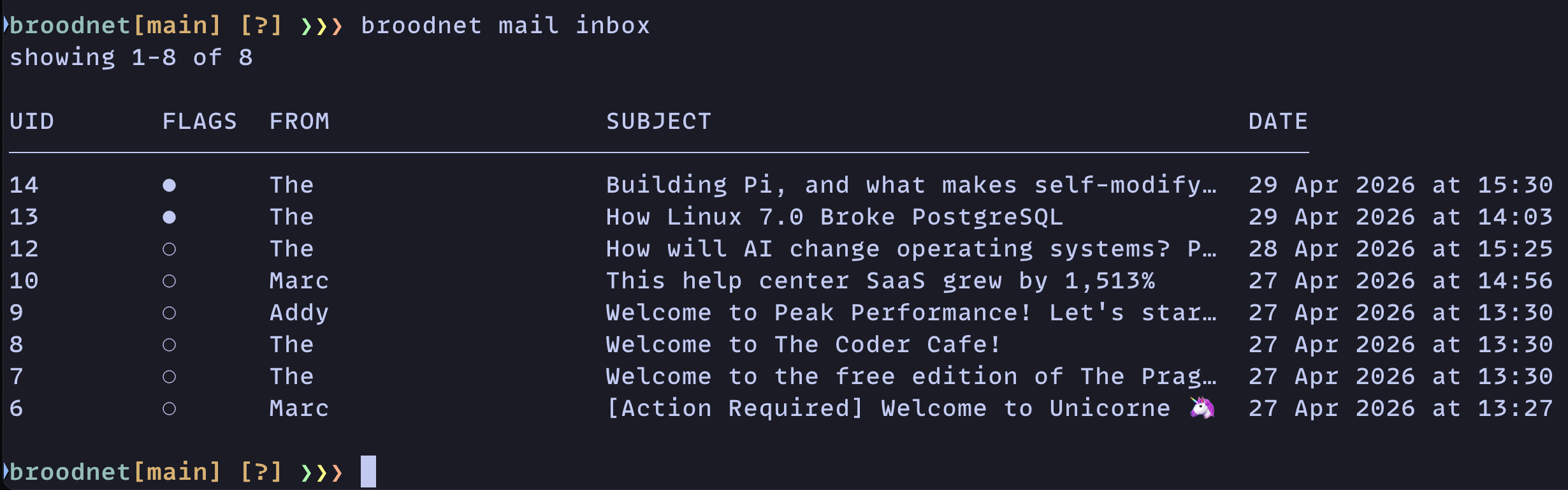
Section titled “Check your inbox”broodnet mail inboxThis shows a summary table of recent messages with UID, flags, sender, subject, and date.
Inbox options
Section titled “Inbox options”| Option | Default | Description |
|---|---|---|
--limit |
20 | Messages per page |
--offset |
0 | Pagination offset |
--sort |
newest | Sort order: newest or oldest |
--unread |
— | Show only unread messages |
--read |
— | Show only read messages |
--important |
— | Show only flagged messages |
--answered |
— | Show only replied-to messages |
--json |
— | Output as JSON |
Search messages
Section titled “Search messages”Use server-side IMAP search when you know the sender, subject text, or earliest received date:
broodnet mail search --from=alerts@example.com --subject=invoice --since=2026-05-01Search results use the same UID, flags, sender, subject, and date columns as mail inbox. Use the returned UID with broodnet mail open <uid>.
Open a message
Section titled “Open a message”broodnet mail open <uid>Opens a message by its UID (shown in the inbox listing). Displays the full message — headers, subject, and body. Opening a message marks it as read.
| Option | Description |
|---|---|
--raw |
Print the raw RFC 822 source instead of formatted output |
--json |
Output structured JSON (headers, body, flags, attachments) |
Wait for a new message
Section titled “Wait for a new message”broodnet mail watchA convenience command designed for OTP and verification code workflows. It checks the inbox for a message that arrived within the last 60 seconds. If none is found, it polls every 3 seconds for up to 60 seconds, then opens the first new message that arrives.
Using IMAP directly
Section titled “Using IMAP directly”Any standard IMAP client can connect to a Broodnet mailbox. Use the connection details from the CLI or the connect endpoint:
- Host: your Broodnet IMAP server
- Port: 993 (IMAPS / TLS)
- Username: the mailbox email address
- Password: the mailbox token
This means tools like mutt, neomutt, or any email client can read a Broodnet mailbox. See the CLI alternatives guide for setup examples.
Message flags
Section titled “Message flags”Messages support standard IMAP flags:
| Flag | Meaning | CLI display |
|---|---|---|
| Seen | Message has been read | ○ (unread) / ● (read) |
| Answered | Message has been replied to | ↩ |
| Flagged | Message marked as important | ★ |
| Forwarded | Message has been forwarded | ⤴ |
Mailbox status
Section titled “Mailbox status”Check storage usage and message counts:
broodnet mail statusShows the mailbox address, quota usage, total message count, and whether IMAP/SMTP access is active. Use --sync to refresh the data from the mail server.
Webhooks
Section titled “Webhooks”Plans that include webhooks can deliver a signed email_received event to your HTTPS endpoint when new mail arrives. Deliveries use the Standard Webhooks 1.0 signing format, so receivers can verify them with a compatible library. Webhooks can cover the whole organization or a specific mailbox. Broodnet records delivery attempts and retries failed requests, so you can inspect delivery status from the Webhooks page in the app.
The notification identifies the mailbox and includes event metadata; read the message itself through IMAP or the CLI. Use IMAP IDLE or broodnet mail watch when the process that receives the notification should also open the message immediately.