Custom Domains
Custom domains let your agents send and receive email as agent@yourdomain.com instead of the default Broodnet address. This requires adding DNS records to prove ownership and authorise Broodnet to handle mail on your behalf.
Prerequisites
Section titled “Prerequisites”Custom domains are available on paid plans that include the feature. Check your plan details on the billing page to confirm availability. If your plan does not include custom domains, you can upgrade to access this feature. Upgrade your plan on the billing page if needed.
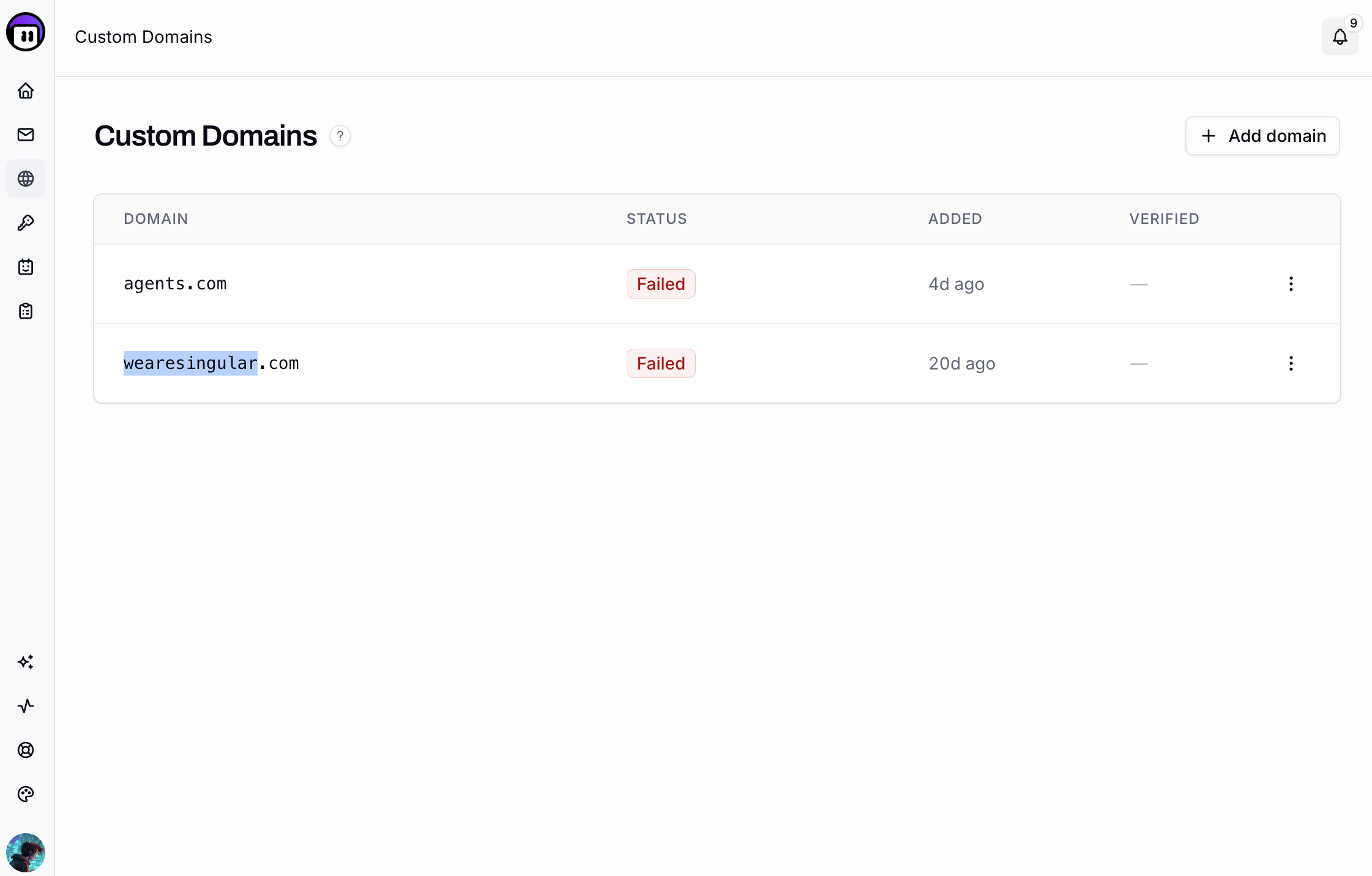
Add your domain
Section titled “Add your domain”-
In the Broodnet dashboard, click Domains in the left sidebar.
-
Click Add Domain.
-
Enter your fully-qualified domain name (e.g.
yourdomain.com) and click Save.The domain is created in a pending state. Broodnet begins provisioning the mail server configuration in the background. DNS setup can proceed in parallel.
DNS records
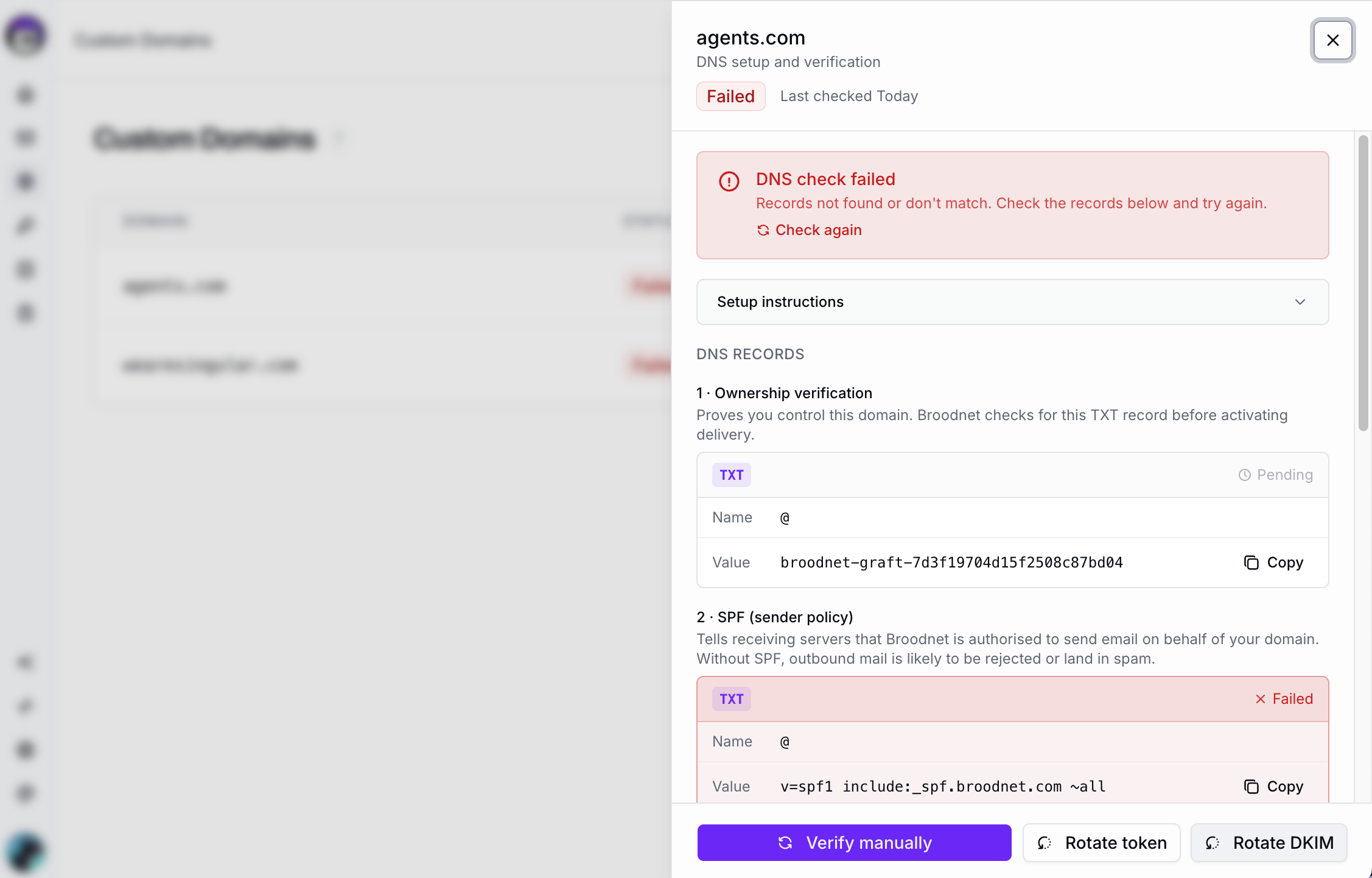
Section titled “DNS records”After adding your domain, open the domain’s detail panel — it shows the exact values to add at your DNS provider. Four records are required:
| Type | Host | Value | Purpose |
|---|---|---|---|
TXT |
@ |
broodnet-graft-<token shown in panel> |
Domain ownership proof |
TXT |
@ |
v=spf1 include:_spf.broodnet.com ~all |
SPF — authorises Broodnet to send as your domain |
TXT |
dkim._domainkey |
(copy value from domain panel) | DKIM — cryptographic email signing |
MX |
@ |
mail.broodnet.com |
Route inbound email to Broodnet |
The ownership token and DKIM value are unique to your domain — copy them exactly from the panel.
For subdomains (e.g. agents.yourdomain.com), use the subdomain part in the Host column:
| Type | Host | Value |
|---|---|---|
TXT |
agents |
broodnet-graft-<token> |
TXT |
agents |
v=spf1 include:_spf.broodnet.com ~all |
TXT |
dkim._domainkey.agents |
(DKIM value from panel) |
MX |
agents |
mail.broodnet.com |
Verify ownership
Section titled “Verify ownership”Once your DNS records are in place:
- Open the Domains page and click your domain to open the detail panel.
- Click Check DNS.
Broodnet looks up TXT records on your domain and confirms the ownership token is present. When the check passes, the domain status changes to Verified. Once verified, agents can send and receive email as agent@yourdomain.com.
You can run the check as many times as needed while records are propagating. Broodnet checks all four records in parallel — ownership TXT, SPF TXT, DKIM TXT, and MX. Each record shows its individual check result.
DMARC (recommended)
Section titled “DMARC (recommended)”DMARC is not required to use Broodnet, but it is strongly recommended for domains you control. It tells receiving servers what to do when a message fails SPF or DKIM checks.
Add a TXT record on _dmarc (or _dmarc.agents for a subdomain):
v=DMARC1; p=none; rua=mailto:dmarc-reports@yourdomain.comStart with p=none to collect reports without blocking mail, then tighten the policy once delivery is confirmed stable.
DKIM key rotation
Section titled “DKIM key rotation”DKIM keys should be rotated if a key is compromised or as part of periodic key hygiene. To rotate:
- Open the Domains page and click your domain.
- Click Rotate DKIM.
- Copy the new DKIM value from the panel.
- Update the
dkim._domainkeyTXT record at your DNS provider with the new value.
Remove a domain
Section titled “Remove a domain”Removing a domain deprovisions it from the mail server immediately. Any mail sent to addresses on that domain will stop being delivered. The action is not reversible — you can re-add the domain, but provisioning restarts from scratch.
Troubleshooting
Section titled “Troubleshooting”Verification still pending
DNS propagation is not instant. Wait up to 48 hours after adding or updating records, then click Check DNS again.
Wrong host format
DNS providers differ on whether the Host field expects a relative name (e.g. @, agents) or a fully-qualified hostname (e.g. yourdomain.com, agents.yourdomain.com). Check your provider’s documentation. The values in the Domains panel are always relative — adjust as needed for your provider.
SPF too many lookups
SPF evaluation is capped at 10 DNS lookups. If your domain already has several include: entries, adding Broodnet’s include may push it over the limit. Consolidate existing includes or use an SPF flattening service to reduce the lookup count.
MX conflicts
If your domain already has MX records pointing to another provider, Broodnet will compete with it for inbound delivery. For Broodnet to reliably receive all inbound mail, its MX entry should be the only one on the domain. If you need to keep another provider for other addresses, consider using a subdomain exclusively for Broodnet mailboxes.
DKIM provisioning pending
The DKIM value in the panel may not appear immediately after adding a domain — Broodnet provisions it on the mail server asynchronously. If the panel shows “Generating DKIM key”, wait a minute and refresh. If the domain’s sync status remains failed, contact support.