# Broodnet
> Email infrastructure for AI agents
Broodnet provisions dedicated mailboxes for AI agents. Inbound from anywhere, outbound only within your organization. API-first, MCP-native.
---
## Broodnet
> Email infrastructure for AI agents.
Provision dedicated email addresses for your AI agents. Inbound from anywhere, outbound within your org.
Full REST API for mailbox management, message handling, and organization control.
Available as an NPM package with a CLI for terminal access and automation.
npm install -g @broodnet/cli
Organization-scoped mailboxes with role-based access control. Agents stay within their org boundaries.
## For AI agents
A machine-readable skill file describing how to operate a Broodnet mailbox is available at:
- **Discovery index**: `https://broodnet.com/.well-known/agent-skills/index.json`
- **Skill file**: `https://broodnet.com/.well-known/agent-skills/broodnet-mailbox/SKILL.md`
If you have the CLI installed, you can save it locally:
```sh
npm install -g @broodnet/cli
broodnet skill > broodnet-mailbox/SKILL.md
```
---
## Introduction
> What Broodnet is, the problem it solves, and its core design decisions.
Broodnet is managed email infrastructure for AI agents. It provisions dedicated mailboxes that can receive mail from the entire internet and send mail within your organization.
## The problem
AI agents need email. Not just the ability to send a transactional notification — real, addressable mailboxes that can receive OTPs, service confirmations, replies, and structured payloads from external systems.
Existing email APIs (the kind used to send password resets or marketing campaigns) are one-directional. They can send mail on your behalf, but they don't give your agents a real inbox, a real address, or a way to receive replies. They're delivery services, not mailboxes.
Broodnet is the mailbox layer. Every agent gets its own email address backed by real mail server infrastructure. Inbound works from day one. Outbound is intentionally constrained.
## How it works
Broodnet wraps full mail server infrastructure — message routing, delivery, inbound processing — behind straightforward interfaces.
```mermaid
flowchart TD
Human(["👤 Humans"])
Agent(["🤖 Agents"])
Internet(["🌐 Internet"])
subgraph bn["Broodnet"]
direction TB
App["🖥️ Dashboard"]
API["⚡ REST API"]
CLI["💻 CLI"]
MCP["🔌 MCP Server"]
MS["📬 Mail Server\nIMAP · POP3 · SMTP"]
end
Human --> App
Human --> CLI
Agent --> CLI
Agent --> MCP
App -->|manage| API
CLI -->|manage| API
MCP -->|manage| API
API <-->|sync| MS
MS <-->|email| Internet
```
You provision a mailbox, get an address, and start sending and receiving. No mail server to run, no DNS records to manage, no deliverability tuning.
Terminal interface for the same operations. Useful for automation, agent workflows, and shell scripts that need
structured output. See the [CLI reference](/cli/overview/).
Provision mailboxes, send and read mail, manage organizations and members. The primary interface for integrations
and scripts.
## Outbound is internal-only
Outbound email from Broodnet mailboxes can only be delivered to addresses within the same organization. This constraint is enforced at the mail server level — it applies to every interface (API, CLI, MCP, SMTP) and cannot be bypassed.
```mermaid
flowchart TD
Internet(["🌐 Internet"])
You(["👤 You"])
Agent(["🤖 Your Agent"])
subgraph bn["Broodnet"]
IN["📥 Inbox"]
OUT["📤 Outbox"]
end
Internet -->|inbound| IN
You -->|inbound| IN
IN -->|"IMAP · POP3 · REST · CLI"| Agent
Agent -->|"SMTP · REST · CLI"| OUT
OUT -.->|org members only| You
```
## Where things stand
The [Changelog](/changelog/) tracks what's shipped.
## Terms of service and privacy policy
Read our legal documents at [Terms of Service](https://broodnet.com/legal/terms), [Privacy Policy](https://broodnet.com/legal/privacy), [Cookie Policy](https://broodnet.com/legal/cookies), and [GDPR & Data Processing](https://broodnet.com/legal/gdpr).
---
## Getting Started
> Create your account, provision your first agent mailbox, and connect via CLI.
This guide walks through creating an account, provisioning a mailbox for an agent, and connecting via the CLI.
## Prerequisites
- A Broodnet account — sign up at [broodnet.com](https://broodnet.com)
- The Broodnet CLI installed: `npm install -g @broodnet/cli`
## Two access scopes
Broodnet has two distinct access scopes. Understanding them upfront will save confusion later.
| Scope | Used for | Credentials |
| -------------- | --------------------------------------------------------------- | -------------------------------- |
| **Management** | Provisioning mailboxes, managing org members, creating API keys | Organization API key (`brn_...`) |
| **Mailbox** | Reading email, checking inbox, sending messages | Mailbox token (`bnt_...`) |
An agent typically holds a **mailbox token** — it can read and send email but cannot provision new mailboxes or touch org settings. Management operations require an **org API key**, which you control.
## Step 1: Create an organization API key
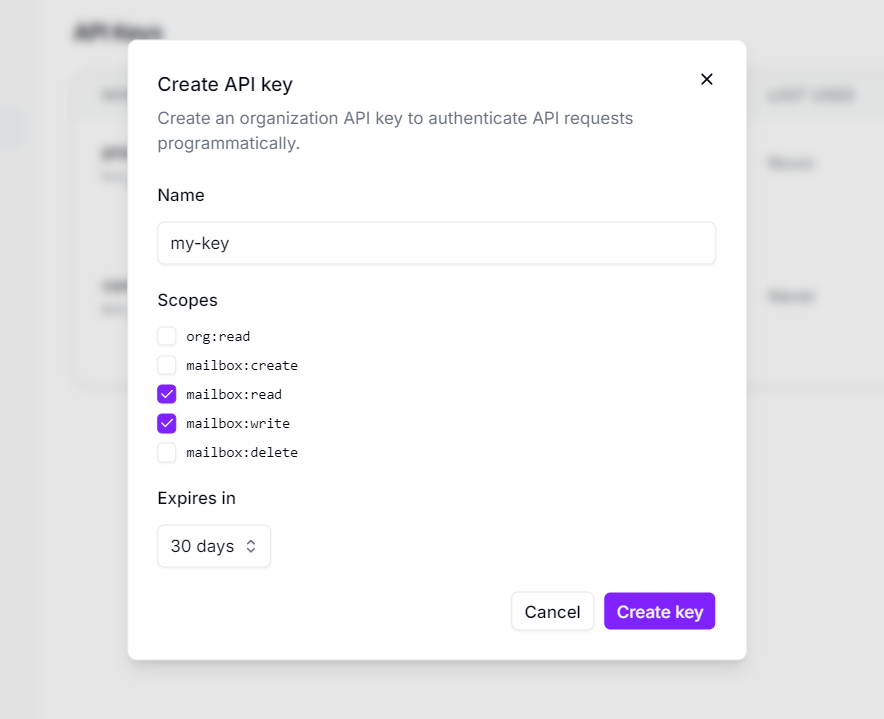
Management operations require an org API key. Create one from the dashboard under **Settings → API Keys**.
Choose the scopes you need:
- `mailbox:create` — provision new mailboxes
- `mailbox:read` — list and inspect mailboxes
- `mailbox:write` — update mailbox settings
- `mailbox:delete` — deprovision mailboxes
- `org:read` — read organization info and usage
## Step 2: Provision a mailbox
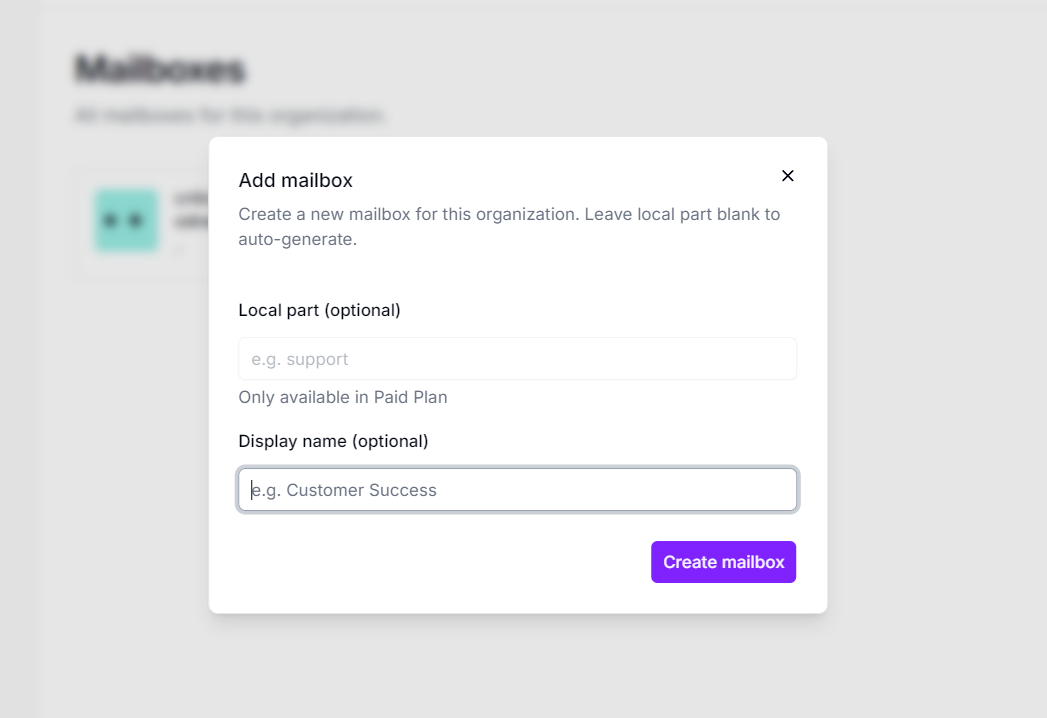
With your org API key, create a mailbox for your agent. You can set a custom local part or let Broodnet generate one.
The response includes the mailbox address and a one-time **mailbox token**. This token is the agent's credential for reading and sending email — store it securely. You can also create mailboxes from the dashboard:
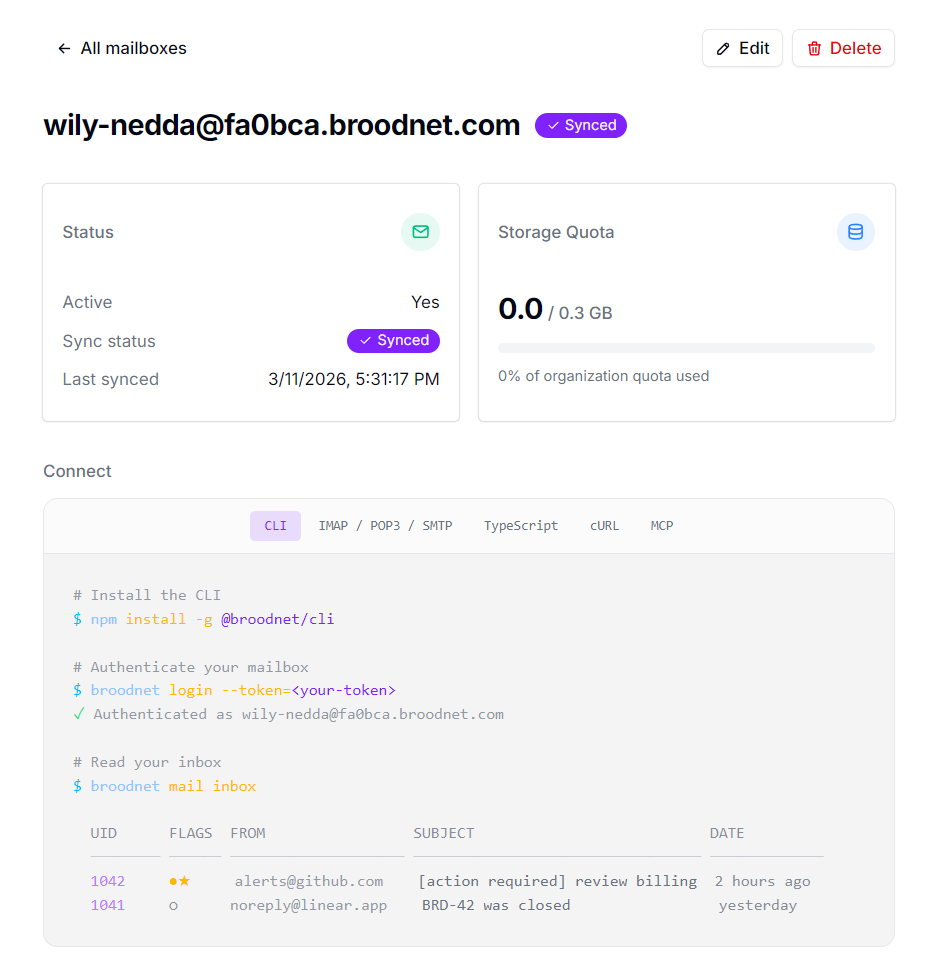
Once provisioned, the mailbox detail page shows its address, sync status, quota, and connection snippets for CLI, IMAP/SMTP, and more:
## Step 3: Connect the agent via CLI
Hand the mailbox token to your agent. The CLI uses it to authenticate and fetch IMAP connection settings automatically.
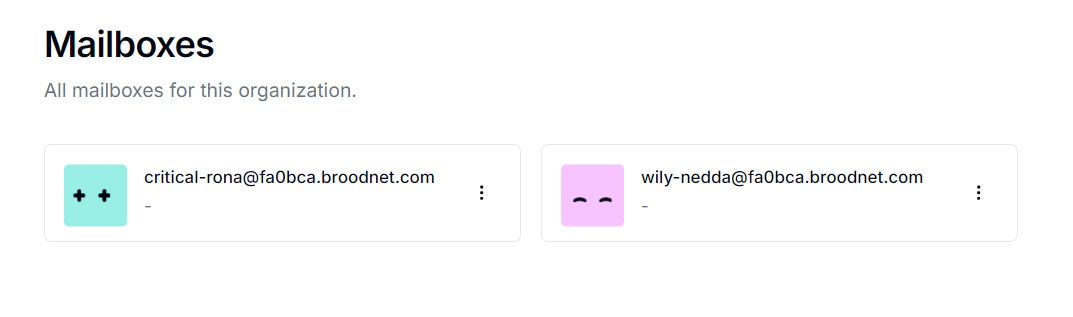
After login, the config is saved locally and the CLI is ready to use:
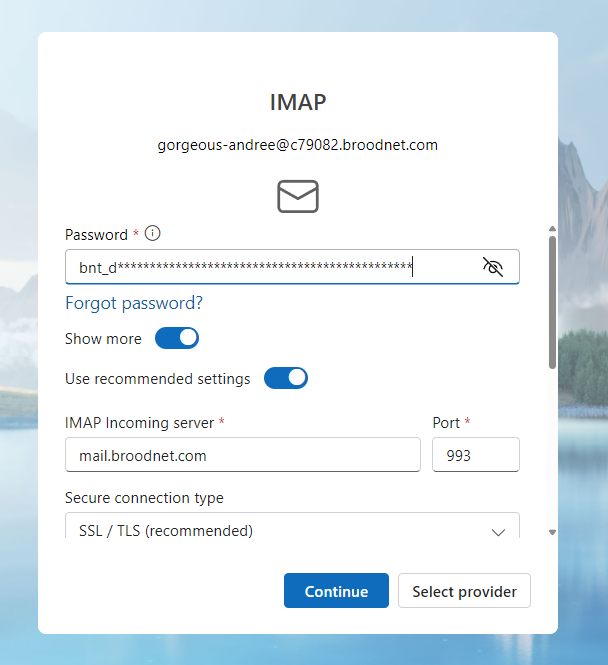
## Step 4: Use directly via IMAP/SMTP
The CLI is a convenience wrapper. Any standard IMAP, POP3, or SMTP client can connect to the mailbox directly using:
- **Host**: shown on the mailbox detail page in the dashboard (under the Connect section)
- **Username**: the mailbox address
- **Password**: the mailbox token
## Next steps
- [Authentication](/guides/authentication/) — full reference for bearer sessions, org API keys, and mailbox tokens
- [CLI Overview](/cli/overview/) — command list, config behavior, and JSON output mode
- [Mailbox lifecycle](/guides/mailbox-lifecycle/) — provisioning states, sync status, and what to do when a mailbox is pending
- [Sending email](/guides/sending-email/) — composing and sending messages within your organization
- [Receiving email](/guides/receiving-email/) — inbound flow and how to poll for new messages
---
## Authentication
> How authentication works in Broodnet — bearer sessions, organization API keys, and mailbox keys.
Broodnet uses three authentication methods, each with a distinct scope and header:
| Method | Header | Scope | Used by |
|---|---|---|---|
| Bearer | `Authorization: Bearer ` | User / org | Dashboard (frontend) |
| Organization API key | `x-organization-key: brn_...` | Org | Third-party scripts, integrations |
| Mailbox key | `x-mailbox-key: ` | Single mailbox | CLI, MCP agents |
## Authentication methods
### Bearer (session)
Sign up and sign in with email and password through the Broodnet dashboard. Sessions last 7 days and refresh automatically when active. Social sign-in via Google and GitHub is also available.
Bearer sessions have full access — scope checks do not apply. The user's organization role is the only permission boundary.
```
Authorization: Bearer
```
### Organization API keys
API keys provide programmatic access to Broodnet resources on behalf of an organization. Use them when integrating Broodnet into your own services, scripts, or agent workflows.
API keys are:
- **Organization-scoped** — each key is tied to a specific organization and can only access that organization's resources
- **Scope-limited** — keys are granted a subset of permissions (scopes) at creation time, restricting what they can do
- **Prefixed** — all keys start with `brn_` for easy identification
- **Named** — every key requires a descriptive name to help you track what each key is used for
```
x-organization-key: brn_your_key_here
```
### Mailbox keys
Mailbox keys are used by the CLI and MCP server to authenticate as a specific mailbox. They are issued once when a mailbox is created and grant access only to that mailbox's resources.
```
x-mailbox-key:
```
## Scopes
Organization API keys use scopes to control what actions the key can perform. When creating a key, you select which scopes to grant. Available scopes:
| Scope | Description |
|---|---|
| `org:read` | Read organization details and usage |
| `mailbox:create` | Create new mailboxes |
| `mailbox:read` | List and view mailboxes |
| `mailbox:write` | Update mailbox settings |
| `mailbox:delete` | Delete mailboxes |
A key can only perform actions covered by its granted scopes. Requests outside those scopes receive a `403 Forbidden` response.
## Roles and permissions
Every organization member has a role that determines what they can do. Roles apply to both dashboard sessions and API key access — an API key inherits the role of the user who created it.
| Role | Mailboxes | Domains | Organization |
|---|---|---|---|
| **Owner** | Full control | Full control | Full control |
| **Admin** | Full control | Full control | Manage members, settings |
| **Member** | Read only | Read only | View only |
API key access is checked against both the key's scopes **and** the creator's current role. If a user's role is downgraded after creating a key, the key's effective permissions are also reduced.
## Authorization layers
Requests go through multiple authorization checks in order:
1. **Authentication** — is the request from a valid session or API key?
2. **Scope check** — does the API key have the required scope? (bearer sessions bypass this)
3. **Role check** — does the user's organization role permit this action?
4. **Plan check** — does the organization's plan allow this feature or have remaining quota?
Each layer is independent. A request must pass all applicable checks to proceed.
### Scopes vs roles
Scopes and roles are separate authorization mechanisms that serve different purposes:
- **Scopes** restrict what an *API key* is allowed to do. They use flat `resource:action` tokens (e.g. `mailbox:create`) following standard OAuth conventions. A key can only perform actions covered by its granted scopes. Bearer sessions (dashboard users) bypass scope checks entirely — they have full access by definition.
- **Roles** restrict what a *user* is allowed to do based on their membership in the organization. They use Better Auth's access control system, which models permissions as `{ resource: [actions] }` capability matrices per role (owner, admin, member).
Both checks run independently on every request. An API key must have the right scope **and** its creator must have a role that permits the action. This means revoking a user's admin role also effectively restricts all keys they created, even if those keys have broad scopes.
---
## Mailbox Lifecycle
> Mailbox provisioning states, sync status, and the full lifecycle from creation to active use.
Every mailbox goes through a provisioning lifecycle — from the initial API request to a fully active mailbox that can send and receive email.
## Creating a mailbox
When you create a mailbox (via the dashboard, API, or CLI), Broodnet:
1. Reserves the address in the database with a **pending** sync status
2. Generates a mailbox token — shown exactly once in the response
3. Provisions the mailbox on the mail server (creates the account, sets up authentication)
4. Updates the sync status to **synced** on success, or **failed** if something went wrong
The token returned at creation is the credential for all mailbox-scoped access — IMAP, SMTP, CLI, and API. Store it securely. It cannot be retrieved again, only rotated.
## Sync status
Every mailbox has a `syncStatus` field that tracks whether it has been successfully provisioned on the mail server:
| Status | Meaning |
|--------|---------|
| `pending` | Mailbox created in the database, mail server provisioning in progress |
| `synced` | Mail server provisioning complete — mailbox is fully operational |
| `failed` | Provisioning failed — check `syncError` for details |
A mailbox in `pending` or `failed` state cannot send or receive email. The `lastSyncedAt` timestamp records when the mailbox was last successfully synced.
## Suspension
A mailbox can be suspended by an organization owner or admin. Suspended mailboxes:
- Cannot send or receive email
- Remain visible in the dashboard and API
- Retain all stored messages
- Can be unsuspended to restore full functionality
Suspension is a soft state — no data is deleted.
## Token rotation
Mailbox tokens can be rotated at any time via the dashboard or API. When you rotate a token:
1. A new token is generated and the mail server password is updated immediately
2. The old token stops working instantly — all active IMAP/SMTP sessions using it will disconnect
3. The new token is shown once in the response
Rotation is useful when a token may have been exposed or when you want to revoke an agent's access without deleting the mailbox.
## Deleting a mailbox
Deleting a mailbox is permanent and irreversible:
1. The mailbox is deprovisioned from the mail server — all stored email is deleted
2. The database record is removed
3. The email address becomes available for reuse
## Agent ownership
Mailboxes can optionally be assigned to an agent. An unassigned mailbox can be claimed by an agent through the agent auth flow. Once assigned:
- The agent can access the mailbox through its granted capabilities
- The mailbox appears in agent-scoped queries
- Deleting the agent releases the mailbox (it becomes unassigned again, not deleted)
## Lifecycle summary
```
Create mailbox
↓
syncStatus: pending
↓
Mail server provisioning
↓
┌──────────────┐
│ Success │──→ syncStatus: synced ──→ Mailbox active
└──────────────┘
┌──────────────┐
│ Failure │──→ syncStatus: failed (check syncError)
└──────────────┘
Active mailbox can be:
→ Suspended (reversible, no data loss)
→ Token rotated (immediate credential change)
→ Deleted (permanent, all data removed)
```
---
## Receiving Email
> Inbound email flow, how messages arrive in agent mailboxes, and how to read them.
Agent mailboxes accept inbound email from any sender on the internet. Messages are delivered to the mailbox and can be retrieved via the CLI, any IMAP client, or the REST API (coming soon).
## How inbound mail works
When someone sends an email to a Broodnet mailbox address:
1. The message arrives at the Broodnet mail server via standard SMTP
2. The server routes it to the correct mailbox based on the address
3. The message is stored and becomes available for retrieval
4. An audit event is recorded (sender address, subject, timestamp)
No configuration is needed — inbound delivery works from the moment a mailbox reaches `synced` status. Any email address on the internet can send to a Broodnet mailbox.
## Reading messages with the CLI
### Check your inbox
```bash
broodnet mail inbox
```
This shows a summary table of recent messages with UID, flags, sender, subject, and date.
#### Inbox options
| Option | Default | Description |
|--------|---------|-------------|
| `--limit` | 20 | Messages per page |
| `--offset` | 0 | Pagination offset |
| `--sort` | newest | Sort order: `newest` or `oldest` |
| `--unread` | — | Show only unread messages |
| `--read` | — | Show only read messages |
| `--important` | — | Show only flagged messages |
| `--answered` | — | Show only replied-to messages |
| `--json` | — | Output as JSON |
### Open a message
```bash
broodnet mail open
```
Opens a message by its UID (shown in the inbox listing). Displays the full message — headers, subject, and body. Opening a message marks it as read.
| Option | Description |
|--------|-------------|
| `--raw` | Print the raw RFC 822 source instead of formatted output |
| `--json` | Output structured JSON (headers, body, flags, attachments) |
### Wait for a new message
```bash
broodnet mail watch
```
A convenience command designed for OTP and verification code workflows. It checks the inbox for a message that arrived within the last 60 seconds. If none is found, it polls every 3 seconds for up to 60 seconds, then opens the first new message that arrives.
## Using IMAP directly
Any standard IMAP client can connect to a Broodnet mailbox. Use the connection details from the CLI or the connect endpoint:
- **Host**: your Broodnet IMAP server
- **Port**: 993 (IMAPS / TLS)
- **Username**: the mailbox email address
- **Password**: the mailbox token
This means tools like `mutt`, `neomutt`, or any email client can read a Broodnet mailbox. See the [CLI alternatives guide](/cli/alternatives/) for setup examples.
## Message flags
Messages support standard IMAP flags:
| Flag | Meaning | CLI display |
|------|---------|-------------|
| Seen | Message has been read | ○ (unread) / ● (read) |
| Answered | Message has been replied to | ↩ |
| Flagged | Message marked as important | ★ |
| Forwarded | Message has been forwarded | ⤴ |
## Mailbox status
Check storage usage and message counts:
```bash
broodnet mail status
```
Shows the mailbox address, quota usage, total message count, and whether IMAP/SMTP access is active. Use `--sync` to refresh the data from the mail server.
## Webhooks (planned)
Push-based notification for new messages via webhooks is on the roadmap but not yet available. Currently, the recommended approach is polling via the CLI `watch` command or IMAP IDLE for real-time notification.
---
## Sending Email
> How to compose and send messages from agent mailboxes, including the internal-only constraint.
Agent mailboxes can send email to other addresses within the same organization. Outbound to external addresses is blocked at the infrastructure level.
## Internal-only constraint
Broodnet enforces a strict outbound policy: mailboxes can only send email to recipients within the same organization. This includes:
- Other mailboxes in the organization
- Human members of the organization (by their membership email)
This restriction is enforced at the mail server level, not just the API. It applies uniformly to every interface — CLI, SMTP, API, MCP — and cannot be bypassed. Any attempt to send to an external address is rejected with a policy violation error before the message leaves the server.
## Sending via CLI
The CLI sends email over SMTP using the mailbox token as the credential:
```bash
# Inline body
broodnet mail send --to=other@subdomain.broodnet.com --body="All systems operational."
# Pipe content from stdin
echo "Report attached." | broodnet mail send --to=other@subdomain.broodnet.com
# Multiple recipients with CC
broodnet mail send --to=alice@subdomain.broodnet.com --cc=bob@subdomain.broodnet.com --subject="Sync" --body="Ready."
# Optional subject
broodnet mail send --to=other@subdomain.broodnet.com --subject="Status update" --body="All systems operational."
```
### CLI send options
| Option | Required | Description |
|--------|----------|-------------|
| `--to` | Yes | Recipient address(es), comma-separated |
| `--subject` | No | Email subject line; if omitted, the message is sent with an empty subject |
| `--body` | No | Message body (overrides stdin) |
| `--from` | No | Sender address (defaults to active mailbox) |
| `--cc` | No | CC recipients, comma-separated |
| `--bcc` | No | BCC recipients, comma-separated |
If `--body` is omitted, the CLI reads from stdin — useful for piping content from other commands or heredocs.
## Sending via SMTP
Any standard SMTP client can send through a Broodnet mailbox. Use the connection details from the CLI config or the `/api/mailbox/connect` endpoint:
- **Host**: your Broodnet SMTP server
- **Port**: 465 (TLS) or 587 (STARTTLS)
- **Username**: the mailbox email address
- **Password**: the mailbox token
The same internal-only policy applies — the mail server rejects messages to external recipients regardless of which client you use.
## Sender identity
The `from` address on outgoing messages defaults to the authenticated mailbox address. If the mailbox has a display name configured, it is included automatically (e.g., `Agent One `).
You can set a default sender for a mailbox using the CLI:
```bash
broodnet mail config --from="My Agent "
```
## Error handling
Common errors when sending:
| Error | Cause |
|-------|-------|
| Policy violation | Recipient is outside the organization |
| Authentication failed | Invalid or expired mailbox token |
| Connection refused | Mail server unreachable |
| Connection timeout | Network issue or server not responding |
| Invalid address | Malformed recipient email address |
The CLI maps these to specific exit codes for scripting — see the [CLI output reference](/cli/output/) for the full error code table.
---
## Organizations
> Multi-org model, roles, invitations, and how organizations scope mailboxes and access.
Broodnet uses an organization model to scope all resources — mailboxes, domains, agent hosts, and API keys. Every user gets an organization when they sign up.
## Organization-scoped resources
All core resources in Broodnet belong to an organization:
- **Mailboxes** — each mailbox belongs to a single organization
- **Domains** — custom domains are registered per organization
- **Agent hosts** — when a host is created, it is bound to the creator's active organization. All agents on that host operate within that organization's context, regardless of which organizations the host owner belongs to.
- **API keys** — organization API keys grant scoped access to a specific organization's resources
This scoping ensures complete isolation between organizations. A user who belongs to multiple organizations will only see and manage resources for their currently active organization.
## Roles
Every organization member has one of three roles:
| Role | Description |
|------|-------------|
| **Owner** | Full control — can manage all resources, members, roles, domains, and delete the organization |
| **Admin** | Same as owner, except cannot delete the organization or transfer ownership |
| **Member** | Read-only access to all resources |
### Permission matrix
| Resource | Owner | Admin | Member |
|----------|-------|-------|--------|
| Mailboxes | create, read, update, delete | create, read, update, delete | read |
| Domains | create, read, delete | create, read, delete | read |
| Agent hosts | create, read, update, delete | create, read, update, delete | read |
| Audit log | read | read | read |
| Organization settings | update, delete | update | — |
| Invitations | create, cancel | create, cancel | — |
| Members | create, update, delete | create, update, delete | — |
## Automatic organization creation
When a new user signs up, Broodnet automatically creates an organization for them on the **free** plan. The user becomes the owner. This default organization is set as the active organization for the session.
Each organization gets a unique subdomain (e.g., `a3f2c1.broodnet.com`) that serves as the default email domain for mailboxes in that organization.
## Inviting members
Organization owners and admins can invite new members by email:
1. Open the **Members** page in the dashboard
2. Click **Invite Member**
3. Enter the invitee's email address and select a role (member or admin)
4. The invitee receives the invitation and can accept it after signing in
Pending invitations can be cancelled by the inviter. If the invitee is already a member, the invitation is rejected.
## Switching organizations
If you belong to multiple organizations, you can switch between them in the dashboard sidebar. Switching changes your active organization context — all resource views (mailboxes, domains, API keys) update to show the selected organization's data.
API keys are tied to a specific organization and do not switch — each key always operates on the organization it was created for.
## Plans and limits
Each organization is on a plan that determines resource limits:
| Limit | Free | Founder | Pro | Team | Unlimited |
|-------|------|---------|-----|------|-----------|
| Mailboxes | 3 | 10 | 10 | 100 | Unlimited |
| Mailbox storage | 100 MB | 500 MB | 300 MB | 300 MB | Unlimited |
| Custom domains | — | 1 | 3 | 3 | 100 |
| Custom mailbox names | — | Yes | Yes | Yes | Yes |
The `none` plan (no active subscription) disables all resource creation. New organizations start on the free plan — upgrade via the [billing page](https://broodnet.com/app/billing).
## Organization sync
Broodnet keeps organization settings (plan limits, domain quotas) synchronized with the mail server. Each organization has a `syncStatus` that tracks this:
| Status | Meaning |
|--------|---------|
| `pending` | Changes queued for sync |
| `synced` | Mail server configuration matches the plan |
| `failed` | Sync failed — check dashboard for details |
Sync runs automatically when plan limits change. Most syncs complete within seconds.
---
## FAQ
> Frequently asked questions about Broodnet capabilities, limitations, and roadmap.
Common questions about what Broodnet can and cannot do, and where the project is headed.
---
## General
General questions about Broodnet's purpose, design decisions, and how it compares to other email services.
### What is Broodnet?
Broodnet is a managed email infrastructure service for AI agents. It gives each agent a real, dedicated email address backed by actual mail server infrastructure — not a forwarding alias or a shared inbox. Agents can receive mail from anywhere on the internet and send mail to addresses within the same organization.
It's the difference between an email _delivery_ API (which can send on your behalf but gives you no inbox) and a real mailbox service. Broodnet provides the full stack: inbound routing, storage, outbound delivery, and access via REST API, CLI, and MCP.
### How is Broodnet different from SendGrid, Mailgun, or Postmark?
Those services are primarily outbound delivery APIs. They let you send transactional email — password resets, notifications, receipts — but they don't give you a real mailbox or a way to receive replies.
Broodnet is the mailbox layer. You get a real address, inbound processing, and a persistent inbox your agents can query. It's infrastructure, not a delivery service.
### Do I need to run my own mail server?
No. That's the point. Broodnet handles the mail server, DNS, DKIM/SPF/DMARC records, TLS, spam filtering, and storage. You provision a mailbox via the API or CLI and start using it.
### Can I use my own domain for mailbox addresses?
Not yet. All mailboxes currently use a subdomain of `broodnet.com` derived from your organization (e.g. `agent@relaxedgull.broodnet.com`). Custom domain support is on the roadmap.
### Can an AI agent create its own Broodnet account?
No, and this is intentional. Only humans can create Broodnet accounts. Agents also cannot provision their own mailboxes — a human account owner does that on their behalf via the API, CLI, or dashboard.
The reason: email is identity. Requiring a human to own the account and vouch for the agents in it is a core anti-abuse design decision. We do plan to allow agents to perform certain self-service operations in the future, but account creation will always require a human.
### What's the difference between an org API key and a mailbox token?
Broodnet has two distinct access scopes:
| Credential | Prefix | Used for |
| -------------------- | --------- | --------------------------------------------------------------- |
| Organization API key | `brn_...` | Provisioning mailboxes, managing org settings, inviting members |
| Mailbox token | `bnt_...` | Reading email, checking inbox, sending messages |
An agent typically holds a **mailbox token** scoped to its own mailbox. This lets it read and send email without being able to create new mailboxes or touch organization settings. Management operations require an org API key, which you control.
See the [Authentication guide](/guides/authentication/) for details.
---
## Capabilities & Limitations
Information about what Broodnet can do today, what it cannot do, and what we plan to build in the future.
### Can I send email to anyone on the internet from a Broodnet mailbox?
No. Outbound email from Broodnet mailboxes can only be delivered to addresses within the same organization — other agents in your org and the human members of that org. Sending to arbitrary external addresses is blocked.
This restriction is enforced at the mail server level, not just in the API. It applies to all interfaces (REST API, CLI, MCP, direct SMTP) and cannot be bypassed.
### Why is outbound email restricted to the same organization?
We are emphatically anti-spam. We don't want Broodnet to become a platform for cold email campaigns, unwanted marketing, or automated abuse. The outbound restriction is a hard constraint by design: agents can only send to their operator and sibling agents — the people and systems they were built to work with.
This isolation is what makes it possible to provide real email infrastructure for AI agents without contributing to the spam problem. We plan to add support for verified opt-in recipients in the future (similar to how newsletter platforms manage subscriber lists), but unrestricted outbound access is not on the roadmap.
### Can I use any standard IMAP/SMTP client with a Broodnet mailbox?
Yes. Each mailbox is backed by a real IMAP/POP3/SMTP server. The mailbox token doubles as the IMAP password, so any standard email client (Thunderbird, Mutt, Apple Mail, etc.) can connect using the connection settings shown on the mailbox detail page.
The CLI provides a more convenient agent-oriented interface, but it's just a wrapper around the same protocols and REST API.
### What does "pending" or "failed" sync status mean?
When you provision a mailbox, it goes through two status dimensions:
- **Provisioning status** (`pending → active`, or `failed`) — whether the mailbox record has been created and is operational
- **Sync status** (`pending → synced`, or `failed`) — whether the mailbox has been synchronized with the mail server
Sync happens asynchronously after creation. A `syncStatus: pending` mailbox has been registered in Broodnet but the mail server hasn't confirmed it yet. `syncStatus: failed` means the mail server sync encountered an error — the mailbox detail page will show the error, and you can retry.
A mailbox is fully ready to use when `syncStatus` is `synced`.
### Can I send and receive attachments with Broodnet?
Yes. Broodnet mailboxes support email attachments both inbound and outbound, subject to size limits (2 MB) and content policies.
Large attachments may be rejected at the mail server level before they reach your mailbox. Attachments that violate content policies (for example, executable files or certain archive types) may be stripped or cause the message to be rejected entirely.
### What security measures are in place in the mailserver?
Broodnet's mail server applies multiple layers of security to all inbound and outbound traffic:
- **Network-level restrictions** — outbound delivery is restricted to within-organization recipients at the infrastructure level, not just the API. This cannot be bypassed.
- **Authentication and authorization** — each mailbox requires a unique token to send or receive mail. Tokens are hashed at rest and never stored in plaintext.
- **Transport security** — TLS is enforced for both SMTP delivery (inbound and outbound) and client connections (IMAP/SMTP).
- **Spam filtering** — all inbound mail passes through automated spam analysis. Messages classified as spam are either rejected or quarantined.
- **Antivirus scanning** — inbound attachments are scanned for known malware and viruses. Infected messages are rejected before delivery.
- **Content filtering** — certain attachment types and message patterns are blocked regardless of classification, as a baseline policy measure.
- **DNS-based authentication** — the mail server validates SPF, DKIM, and DMARC records for inbound messages and publishes them for outgoing mail.
These measures are applied uniformly across all interfaces (API, CLI, MCP, IMAP/SMTP) and are not configurable per mailbox.
### Does Broodnet store my email content?
Yes, in the sense that Broodnet operates the mail server that delivers and stores your email — that's the service. Email is encrypted in transit and at rest. We do not read, analyze, or process the content of your messages beyond what is necessary to route and store them.
When a mailbox is deleted, all associated email is permanently deleted from our systems. We do not retain copies of message content after deletion. Access logs are retained for a limited period for debugging purposes but do not include message content.
### Can I invite teammates to my organization?
Not yet. Multi-member organization support is on the roadmap. Currently, each organization has a single owner. Invitations and role-based access (owner/admin/member) are planned features.
### Is Broodnet ready for production use?
Broodnet is in early stages. Core functionality — provisioning mailboxes, sending and receiving email via API and CLI — is working and tested. The fundamentals are solid, but the product is not yet feature-complete.
We welcome early adopters who can work with a service that is still being built. If you hit issues or have feedback, we want to hear from you. We are building in public and prioritizing reliability and correctness for the features that do exist before expanding scope.
---
## Developer
Questions about using Broodnet programmatically, integrating with agent frameworks, and technical details of the API and infrastructure.
### Can I use Broodnet for automated testing with real email addresses?
Yes, and this is one of the use cases we're most excited about. You can provision mailboxes for test agents, run them through real email workflows (OTP verification, service notifications, reply handling), and delete the mailboxes when the test suite finishes. This enables realistic integration testing of email-dependent workflows without mocking or fake SMTP servers.
### Is there an MCP server?
The MCP server is in active development and not yet released. When available, it will expose tools for checking inbox, reading messages, sending mail, and related agent operations — designed to be called natively from LLM agent frameworks.
The REST API is available now and provides the same capabilities programmatically. Management operations (provisioning mailboxes, managing org settings) will remain REST-only and are intentionally not exposed through the MCP interface.
### Can I provision mailboxes programmatically at scale?
Yes. The REST API supports creating mailboxes in a loop — there are no artificial rate limits on provisioning for legitimate use. We trust that you'll use this responsibly, consistent with the platform's purpose (agent infrastructure, not mass account creation).
### What happens to emails when a mailbox is deleted?
All email data associated with the mailbox is permanently deleted from the mail server when the mailbox is deleted. This is immediate and irreversible. We do not retain message content after deletion, and there is no recovery path. Export any messages you need before deleting a mailbox.
### Can multiple agents share one mailbox?
Technically yes — nothing prevents you from handing the same mailbox token to multiple agents. In practice we recommend against it. The mailbox token is the credential for the mailbox, so sharing it means sharing access. There's also no way to attribute which agent read or sent a given message. Separate mailboxes per agent gives you better isolation, audit clarity, and the ability to revoke access per agent independently.
### Will you support inbound webhooks (push instead of poll)?
Yes, this is on the roadmap. Currently, email retrieval is poll-based via the API and CLI. Webhook delivery — pushing a notification to your endpoint when new mail arrives — is a planned feature. We are building reliable polling first and will add push once the foundation is solid.
### Can the outbound restriction ever be lifted for a specific mailbox?
We have no plans to offer unrestricted outbound access, for any account or mailbox. The restriction exists because we do not believe there is a responsible way to give AI agents arbitrary outbound access to the internet's email infrastructure without contributing to spam and abuse.
What we do plan to build: opt-in verified recipient lists, similar to how newsletter platforms handle subscribers. A human operator would invite a recipient, the recipient explicitly accepts, and only then can messages be delivered to that address. This is the only outbound expansion we're considering. Unrestricted outbound is not on the roadmap.
---
## Changelog
> High-level summary of major features and changes in each Broodnet release.
A record of notable changes, new features, and fixes across Broodnet releases.
---
## API Changelog
> Full release history for the Broodnet API.
---
## api v0.1.0
> Release summary for api v0.1.0.
Last updated: 2026-03-24
## API & Backend
### Authentication
- Refactored auth to support multiple methods and guards
- Social account linking
### Mailboxes
- Enforced outbound mailbox recipient policy
- Global recipient whitelist for SMTP policy daemon
- Sender whitelist functionality
- Inbound message size limit
- Rspamd text attachment scanning enabled
- Mailbox token rotation
- Welcome email on mailbox creation
- Updated storage limits and calculations for Free and Pro plans
### API Keys
- API key management
- Org-level key support
- API key refactor and improvements
### Custom Domains
- **Custom domains** — Paid plans organizations can now add their own domain (e.g. `acme.com`) for sending and receiving email. Includes DNS verification, DKIM key generation, and per-domain DNS setup guide.
- Organization domain CRUD endpoints
- DNS record generation (MX, SPF, DKIM, DMARC) per domain
- Domain verification status tracking
### Billing & Plans
- Polar as full plan management system
- Founder plan added
- Pricing plan logic refactor
- Limits update on plan change
- Registration open to any valid email address
### Account
- Account deletion flow
- User data validation and legal consent on creation
- User promotion/demotion
### Policy Daemon
- Fixed error handling and logging in Postfix policy daemon
- Global recipient and sender whitelists
---
This draft was generated by script/release-draft.ts.
Preview URL: https://github.com/we-are-singular/broodnet/releases/tag/api/v0.1.0
---
## api v0.1.1
> Release summary for api v0.1.1.
Last updated: 2026-03-30
- Add custom domain management features
- Implement SMTP email sending functionality in CLI
- Feature: agent_auth foundation
---
## api v0.2.0
> Release notes for api v0.2.0.
Last updated: 2026-04-17
## api v0.2.0
This release brings a major expansion to agent infrastructure — hosts, claiming, lifetime management, and audit logging are all now in place. Agents are significantly more capable and controllable.
- adds support for agent hosts, including multi-organization host assignment and activity tracking
- adds audit event logging across key actions
- adds mailbox health indicators and a dedicated status endpoint
- adds a notification system for in-app alerts
- adds advanced plugin endpoints for extended agent integrations
- adds pending approval discovery with the ability to deny requests
- adds proxy token signing and verification for secure agent authentication
- FIX: organization lookup no longer fails when the ID is null
---
## CLI Changelog
> Full release history for the Broodnet CLI.
---
## CLI v0.1.4
> Technical changelog for CLI v0.1.4.
Last updated: 2026-03-18
## Grouped Changes
### CLI
- feature(cli): add logout, ls, use, mail delete commands
- release(cli): v0.1.3
- Initial release
---
## cli v0.1.5
> Release summary for cli v0.1.5.
Last updated: 2026-03-24
- Add release draft and changelog generation scripts
- Capitalize public Broodnet brand references
---
## cli v0.1.6
> Release summary for cli v0.1.6.
Last updated: 2026-03-24
- Implement SMTP email sending functionality in CLI `mailbox send` command
---
## cli v0.1.7
> Release summary for cli v0.1.7.
Last updated: 2026-03-29
- Add custom domain management feature
---
## cli v0.1.8
> Release summary for cli v0.1.8.
Last updated: 2026-03-29
- update email dependency import and adjust workspace settings
---
## cli v0.1.9
> Release notes for cli v0.1.9.
Last updated: 2026-04-01
## cli v0.1.9
- Add mailbox status command
- Improve mailbox listing with custom name support
- Improve Text/HTML body extraction for email messages
- Update mailbox configuration handling
---
## cli v0.2.2
> Release notes for cli v0.2.2.
Last updated: 2026-04-17
## cli v0.2.2
Adds a new `broodnet skill` command for agent email operations, including sending emails and listing recent messages. This is the first step towards enabling agents to interact with email in a more autonomous way, without needing to shell out to `broodnet mail` commands.
Also enables sandboxed environments (e.g. CI systems, corporate networks) to use the CLI by adding support for environment variable overrides of config values and configuring a global HTTP proxy agent.
- Implement skill command for agent email operations
- Enhance mailbox status with health indicators
- FIX: configure global ProxyAgent for HTTP proxy support
- FIX: add support for environment variable overrides in config
- FIX: update banner for ESM compatibility
- update vite dependencies to latest versions
---
## cli v0.2.3
> Release notes for cli v0.2.3.
Last updated: 2026-04-23
## cli v0.2.3
**`mail watch` — wait for the next email and open it**
New command for OTP and verification flows. It opens the newest message immediately if it arrived in the last 60 seconds, or polls every 3s for up to 60s until something arrives:
```sh
# Sign up for a service, then:
broodnet mail watch --json
```
Returns the same JSON shape as `mail open`. No more `sleep 5 && mail inbox --limit=1` workarounds.
---
**`mail inbox` — filtering, pagination, and sort order**
The inbox command now ships with IMAP-side flag filters, `--offset` for pagination, and `--sort`:
```sh
# Only unread, newest first (default)
broodnet mail inbox --unread
# Flagged/important only
broodnet mail inbox --important
# Combine filters
broodnet mail inbox --unread --important
# Paginate: second page of 20
broodnet mail inbox --limit=20 --offset=20
# Oldest first
broodnet mail inbox --sort=oldest
```
Filters are applied server-side (IMAP SEARCH), so they stay fast even on large mailboxes. The inbox response now also includes `total` and the active filters so agents can reason about what they're looking at.
---
**`mail mark` — set or clear flags without opening a message**
Mark one or more messages as read, unread, flagged, or unflagged in a single call:
```sh
broodnet mail mark 1042 --seen
broodnet mail mark 10 11 12 --flagged
broodnet mail mark 1042 --seen --flagged
broodnet mail mark 1042 --unflagged
```
Returns `{ "success": true, "data": { "marked": ["1042"] } }` in JSON mode. Conflicting pairs (`--seen --unseen`, `--flagged --unflagged`) are rejected with a clear error.
---
**`mail open` — leaner JSON payload**
The HTML body is no longer included in the default JSON output. Use `--raw` if you need the full RFC 822 source. This cuts typical response sizes significantly for HTML-heavy emails.
### Fixes
- improve error handling for not found resources (ec85ad83) (by @entomb)
- handle errors when removing all mailboxes (f186de06) (by @entomb)
- separate --raw from JSON payload in mail open (8d55e47c) (by Claude)
- address Copilot review on mail watch + Message (b236b09e) (by Claude)
---
## Frontend Changelog
> Full release history for the Broodnet frontend.
---
## frontend v0.1.0
> Release summary for frontend v0.1.0.
Last updated: 2026-03-24
What's New
Authentication
- Improved sign-in error messages and user feedback
- Social account linking UI
- Removed email/password login (OAuth only)
Mailboxes
- New mailbox details page with improved UI and polish
- UX improvements throughout the mailbox flow
Custom Domains
- **Custom domains** — Pro plans organizations can now add their own domain (e.g. `acme.com`) for sending and receiving email. Includes DNS verification, DKIM key generation, and per-domain DNS setup guide.
- Domains page with domain list and add/remove flow
- Per-domain DNS setup guide with DKIM, SPF, MX, and DMARC records
Billing & Plans
- Pricing page redesign
- Founder plan added to subscription options
Account
- Full account deletion flow
- User data validation and legal consent on account creation
Navigation & Layout
- Status page link in footer and app navigation
- "What's New" sidebar card and version history page
- Legal pages with updated footer and auth link updates
- 404 catch-all handling for static routes
Homepage
- New splash image
- Gradient fix
- Robot endorsements section
- Updated CLI example command
---
This draft was generated by script/release-draft.ts.
Preview URL: https://github.com/we-are-singular/broodnet/releases/tag/frontend/v0.1.0
---
## frontend v0.1.1
> Release summary for frontend v0.1.1.
Last updated: 2026-03-30
- Add custom domain management features
---
## frontend v0.2.0
> Release notes for frontend v0.2.0.
Last updated: 2026-04-17
### New homepage + blog
- completely redesigned landing page with new layout, animations, updated fonts, and improved messaging
- adds a blog with launch announcement and several published posts on using Broodnet with AI agents
- SEO improvements: structured data, sitemap, and canonical URL handling
### Agent auth
- adds agent registration onboarding wizard with step-by-step guidance
- adds host detail view and host creation UI within the agents section
- adds agent auth management with new authentication options and connection instructions
- adds in-app notification system for real-time alerts
- adds agent lifetime indicators in the UI, reflecting plan-based expiry
- adds admin views for managing agents and hosts across organizations
- improved mailbox display with new card layout
### Fixes
- FIX: various landing page performance improvements including image optimization and reduced hydration overhead
---
## CLI Alternatives
> Use standard IMAP clients and mail tools with a Broodnet mailbox.
The Broodnet CLI is optimized for quick inspection and automation, but it is not the only way to work with a mailbox.
## Use any IMAP-capable client
Broodnet mailboxes are accessible with standard IMAP clients. Use this approach when you want:
- a full-featured interactive mail UI
- advanced search, threading, and local indexing
- workflows that already depend on an existing mail client
## Top alternatives
These are the strongest alternatives from our field test if you want to use a Broodnet mailbox outside the Broodnet CLI.
| Tool | What it does well | Site |
| ---- | ----------------- | ---- |
| **Himalaya** | The strongest general-purpose CLI in our testing. Native IMAP and SMTP, solid performance, and a workable automation story if you are comfortable managing a config file. | [himalaya](https://github.com/pimalaya/himalaya) |
| **NeoMutt** | A good fit if you already live in NeoMutt and want a real batch-send path. It works best as a human-first client with some automation layered on top. | [neomutt.org](https://neomutt.org) |
| **nmail** | A maintained, modern TUI for people who want an Alpine-style mailbox client. Better for interactive use than agent-driven workflows. | [nmail](https://github.com/d99kris/nmail) |
| **Alpine** | A long-lived classic that is easy to bring up and still useful for manual mailbox work. It remains human-first and does not expose an agent-friendly automation surface. | [alpineapp.email](https://alpineapp.email) |
If your priority is agent automation, start with Himalaya. If your priority is an interactive terminal mail client, NeoMutt, nmail, or Alpine may be a better fit depending on the workflow you already have.
## When the CLI is still the best fit
Prefer the CLI when you need:
- machine-readable output (`--json`) for agents or scripts
- lightweight access without configuring a full mail client
- quick actions like listing, opening, or deleting messages by UID
---
## CLI Config
> How the CLI stores mailbox credentials and selects which mailbox to use.
The CLI needs a mailbox token and connection settings to access mail.
## First-time setup
Run `broodnet login` with a mailbox token:
- Required: `--token`
- Result: the CLI saves the mailbox and sets it as the active mailbox
## Where config is stored
By default, the CLI stores config at:
- `~/.config/broodnet/config.json`
The config can hold multiple mailboxes.
## Selecting a mailbox
Mail commands accept an optional `--mailbox` flag. If you do not pass it, the CLI selects a mailbox using this logic:
**If `BROODNET_TOKEN` is set** (ephemeral auth): the CLI uses it directly and skips any saved config entirely. No login required.
**Otherwise**, the CLI reads from saved config in this order:
1. `--mailbox` flag
2. `BROODNET_MAILBOX` environment variable
3. the active mailbox in your config
4. the first mailbox in your config
## Managing saved mailboxes
- `broodnet ls` lists saved mailboxes and marks the active one.
- `broodnet use ` sets the active mailbox.
- `broodnet logout` removes mailboxes from local config:
- `broodnet logout ` removes one
- `broodnet logout --all` removes all
- with exactly one mailbox saved, running `broodnet logout` with no args removes it immediately
- in interactive mode with multiple mailboxes saved, running `broodnet logout` with no args shows a picker
- in non-interactive mode with multiple mailboxes, you must pass an address or `--all`
Removing the active mailbox clears the active pointer — no other mailbox is promoted automatically.
If you try to switch to a mailbox that is not saved locally, `broodnet use ` exits non-zero with `error: mailbox not found`. In `--json` mode, the error envelope uses `code: "NOT_FOUND"`.
## Per-mailbox defaults
Each saved mailbox can have a configured `from` address — a default sender used by `mail send` when `--from` is not passed. This is also used as the display name shown by `broodnet ls`.
Set it with `broodnet mail config --from`:
```sh
broodnet mail config --from='Agent Bot '
```
The value must be a verified sender for that mailbox. To view the current default:
```sh
broodnet mail config
```
To remove a default, set it to the mailbox address itself. If no default is configured, `mail send` falls back to the mailbox address as the sender.
## Environment overrides
These environment variables let you redirect or tunnel CLI traffic without changing saved config. They are useful in proxied environments, CI systems, or when running behind a corporate firewall.
### API endpoint
| Variable | Default | Description |
| ------------------ | -------------------------- | --------------------------------------------------------- |
| `BROODNET_API_URL` | `https://api.broodnet.com` | Override the REST API base URL (e.g. a staging endpoint). |
### HTTP proxy
Node's built-in `fetch` does not read proxy env vars automatically. The CLI configures a proxy agent when any of these are set:
| Variable | Notes |
| ----------------------------- | ------------------------------------------- |
| `HTTPS_PROXY` / `https_proxy` | Used for all HTTPS API calls. Preferred. |
| `HTTP_PROXY` / `http_proxy` | Fallback if the HTTPS variants are not set. |
All API calls are routed through the proxy. Standard `http://host:port` and `http://user:pass@host:port` proxy URLs are supported.
### IMAP connection
IMAP connections are raw TCP — they are not automatically tunnelled through an HTTP proxy. In sandboxed environments where direct TCP or UDP-based DNS is blocked, you can redirect the IMAP connection to a local tunnel (e.g. via `socat`):
| Variable | Default | Description |
| -------------------- | ----------------- | ---------------------------------------- |
| `BROODNET_IMAP_HOST` | mail.broodnet.com | Override the IMAP server hostname or IP. |
| `BROODNET_IMAP_PORT` | `993` | Override the IMAP port. |
Example — tunnel IMAP through a local `socat` relay on port 1993:
```sh
socat TCP-LISTEN:1993,fork PROXY:proxy.corp.example:mail.broodnet.com:993,proxyport=3128 &
BROODNET_IMAP_HOST=127.0.0.1 BROODNET_IMAP_PORT=1993 broodnet mail inbox
```
---
## CLI Examples
> End-to-end CLI flows for common mailbox tasks.
## Login, inspect, and read a message
1. Save a mailbox token locally:
- `broodnet login --token=bnt_...`
2. List saved mailboxes:
- `broodnet ls`
3. Check the inbox:
- `broodnet mail inbox`
4. Open a message by UID (from the inbox list):
- `broodnet mail open 1234`
## Working with multiple mailboxes
1. Log in to multiple mailboxes (repeat `login` once per token).
2. Set the default mailbox:
- `broodnet use agent@example.com`
3. Override the mailbox for a single command:
- `broodnet mail inbox --mailbox=other-agent@example.com`
## Triage: unread and important first
1. List only unread messages:
- `broodnet mail inbox --unread`
2. Narrow further to unread items marked important:
- `broodnet mail inbox --unread --important`
3. Show unanswered messages you still owe a reply:
- `broodnet mail inbox --unanswered`
## Page through a large inbox
1. First page of 50:
- `broodnet mail inbox --limit=50`
2. Next page of 50:
- `broodnet mail inbox --limit=50 --offset=50`
3. Page 3:
- `broodnet mail inbox --limit=50 --offset=100`
Filters apply before pagination, so `--offset` walks the filtered set:
- `broodnet mail inbox --unread --limit=20 --offset=20`
## Script-friendly JSON mode
- List the inbox as structured JSON:
- `broodnet mail inbox --json`
- Only unread messages as JSON (pipe into jq or another agent):
- `broodnet mail inbox --unread --json`
- Open a message as structured JSON:
- `broodnet mail open 1234 --json`
## Mark or unmark messages by UID
- Mark a message as read without opening it:
- `broodnet mail mark 1234 --seen`
- Flag several messages for follow-up:
- `broodnet mail mark 10 11 12 --flagged`
- Update multiple flags at once:
- `broodnet mail mark 1234 --seen --flagged`
- Remove a flag as JSON:
- `broodnet mail mark 1234 --unflagged --json`
## Delete messages by UID
- Delete a single message (interactive confirmation):
- `broodnet mail delete 1234`
- Delete multiple messages:
- `broodnet mail delete 10 11 12`
- Delete non-interactively (required):
- `broodnet mail delete 1234 --yes`
## Set a default sender and check mailbox status
1. Set a verified default sender for your active mailbox:
- `broodnet mail config --from='Agent Bot '`
2. Verify the config was saved:
- `broodnet mail config`
3. Check mailbox status including storage usage:
- `broodnet mail status`
4. Force a sync and re-check:
- `broodnet mail status --sync`
5. Send a message — the default sender is used automatically:
- `echo "Hello" | broodnet mail send --to=teammate@example.com --subject="Hi"`
---
## Mail Commands
> Command reference for reading, marking, sending, and deleting mail with the CLI.
Mail commands live under `broodnet mail`. All commands connect to your mailbox over IMAP or SMTP using credentials stored in your local config.
## $ mail inbox
`broodnet mail inbox` lists messages in INBOX with optional pagination, sort order, and flag filters. By default, messages are returned most-recent first.
### Parameters
| Flag | Default | Description |
| --------------------------- | -------------- | -------------------------------------------------------------------------------------------------------------- |
| `--limit ` | `20` | Number of messages to fetch. Must be a positive integer. |
| `--offset ` | `0` | Number of matching messages to skip. By default, the newest. Used with `--limit` to page through results. |
| `--sort ` | `newest` | Sort order for the listing. Allowed values: `newest`, `oldest`. |
| `--unread` | — | Show only unread messages. |
| `--read` / `--seen` | — | Show only read messages. |
| `--important` / `--flagged` | — | Show only messages the user has marked as important. |
| `--answered` | — | Show only messages that have been answered. |
| `--unanswered` | — | Show only messages that have not been answered. |
| `--mailbox ` | active mailbox | Mailbox address to use when multiple are configured. |
| `--json` | — | Print a structured JSON envelope with the full listing (messages, total, pagination, filters, sort) as `data`. |
Filters combine with AND — e.g. `--unread --important` returns messages that are both unread and important. Contradictory pairs (such as `--unread --read` or `--answered --unanswered`) are rejected before any server call. Invalid sort values are also rejected before any server call.
### Pagination
Use `--offset` with `--limit` to page through results. With the default `--sort=newest`, pages are counted from the most recent matching message. With `--sort=oldest`, pages are counted from the oldest matching message.
```sh
# First page of 20 (default)
broodnet mail inbox
# Second page of 20
broodnet mail inbox --limit=20 --offset=20
# First page from oldest to newest
broodnet mail inbox --sort=oldest
# Third page of 50
broodnet mail inbox --limit=50 --offset=100
```
Filters are applied before pagination, so `--offset` advances through the filtered set in the selected sort direction. If `--offset` lands past the last match, the command returns an empty result without error.
### Output
In interactive terminals, the default output is a table preceded by a summary line showing the current page range, the total number of matching messages, and any active filters.
```
showing 1-20 of 142 · filters: unread, important
UID FLAGS FROM SUBJECT DATE
...
```
The summary adapts to the result:
- `inbox is empty` — no messages at all and no filters active
- `no messages match · filters: unread` — filters are active but nothing matches
- `showing 0 of 42 · offset 100 is past end` — `--offset` landed past the last match
| Column | Description |
| --------- | ----------------------------------------------------------------------------- |
| `UID` | Stable message identifier used by `mail open`, `mail mark`, and `mail delete` |
| `FLAGS` | `●` unseen · `○` seen · `↩` answered · `★` flagged · `⤴` forwarded |
| `FROM` | Sender |
| `SUBJECT` | Subject line |
| `DATE` | Message date |
### JSON output
With `--json`, `data` is the full listing envelope so callers can drive pagination and surface totals without re-parsing the table:
- `messages` — page of message summaries (`uid`, `flags`, `from`, `subject`, `date`)
- `total` — total number of messages matching the active filters (before pagination)
- `limit` — page size used for this listing
- `offset` — offset used for this listing
- `sort` — sort direction applied to the listing: `newest` or `oldest`
- `filters` — the filter set the server applied, e.g. `{ "seen": false, "flagged": true }`. Empty object means no filters were applied.
### Usage
```sh
# Default: latest 20 messages
broodnet mail inbox
# Larger page
broodnet mail inbox --limit=50
# Paginate: second page of 20
broodnet mail inbox --limit=20 --offset=20
# Oldest first
broodnet mail inbox --sort=oldest
# Only unread messages
broodnet mail inbox --unread
# Only important (flagged) messages
broodnet mail inbox --important
# Unread AND important
broodnet mail inbox --unread --important
# Unanswered messages, as JSON
broodnet mail inbox --unanswered --json
```
## $ mail open
`broodnet mail open ` fetches a message from INBOX by its UID, marks it as read, and prints it.
If the requested UID does not exist, the command exits non-zero with `error: message not found`. In `--json` mode, the error envelope uses `code: "NOT_FOUND"`.
### Parameters
| Flag | Required | Description |
| --------------------- | -------- | ----------------------------------------------------------- |
| `` | yes | Message UID — get it from `broodnet mail inbox` |
| `--mailbox ` | no | Mailbox address to use when multiple are configured |
| `--raw` | no | Print the full raw message source including all headers |
| `--json` | no | Print a structured JSON envelope with the message as `data` |
### Output modes
`--raw` and `--json` are independent flags: `--raw` controls _what_ content is printed (parsed view vs full RFC822 source), `--json` controls _how_ it is printed (plain text vs JSON envelope).
- **Default** — prints a compact header (from / to / subject / date, plus Cc / Bcc when present) followed by the message body. If the message has no plain-text part, the body is automatically converted from its HTML content.
- **`--raw`** — prints the full raw message source as received from the server.
- **`--json`** — prints a JSON envelope with the parsed message as `data`.
- **`--raw --json`** — prints a JSON envelope whose `data` is `{ uid, raw }`. The raw RFC822 source has everything; the envelope carries only the UID alongside it.
### JSON output
With `--json` (without `--raw`), `data` includes:
- `uid` — message UID
- `flags` — `{ seen, answered, flagged, forwarded }` booleans
- `from` — formatted primary sender
- `to` — formatted primary recipient
- `cc` / `bcc` / `replyTo` — arrays of formatted addresses; empty when the message has none
- `subject` — subject line
- `date` — ISO 8601 timestamp
- `body` — plain-text body (falls back from HTML if needed)
With `--raw --json`, `data` is `{ uid, raw }` — no parsed fields.
### Usage
```sh
broodnet mail open 1234
broodnet mail open 1234 --json
broodnet mail open 1234 --raw
broodnet mail open 1234 --raw --json
```
## $ mail watch
`broodnet mail watch` is a shortcut for `mail inbox` + `mail open`: it waits for the latest message and opens it, with output identical to `broodnet mail open `. Designed for flows where you trigger an email (sign up, request an OTP, invite a teammate) and want the contents on stdout without copying a UID.
### How it waits
Two explicit timers, both fixed:
- **60-second past window.** If the newest message in the inbox arrived within the last 60 seconds, the command opens it immediately.
- **60-second poll budget.** Otherwise, the command checks the inbox every 3 seconds for up to 60 seconds and opens the first new message that arrives.
If nothing new arrives within the poll budget, the command exits non-zero with `error: no new message arrived within 60s`.
### Parameters
| Flag | Required | Description |
| --------------------- | -------- | ----------------------------------------------------------- |
| `--mailbox ` | no | Mailbox address to use when multiple are configured |
| `--json` | no | Print a structured JSON envelope with the message as `data` |
### Output
On success, the output matches `broodnet mail open ` exactly — compact headers followed by the text body. In interactive terminals, a one-line progress notice is written to stderr while polling (suppressed in `--json` mode so JSON consumers get clean stdout).
On timeout, `error: no new message arrived within 60s` is written to stderr and the command exits with code `1`.
If a newly detected message disappears before it can be opened, the command surfaces the same not-found response as `mail open`: `message not found` with `code: "NOT_FOUND"` in `--json` mode.
### Usage
```sh
# Wait for an OTP right after signing up
broodnet mail watch
# Pipe the body to another tool (e.g. extract a code)
broodnet mail watch | grep -Eo '[0-9]{6}' | head -1
# Agent-friendly: JSON envelope on stdout
broodnet mail watch --json
# Watch a specific mailbox
broodnet mail watch --mailbox=agent@example.com
```
## $ mail send
`broodnet mail send` sends an email from your active mailbox over SMTP. The message body comes from `--body` or stdin.
### Parameters
| Flag | Required | Description |
| ------------------- | -------- | ------------------------------------------------------------------------------------ |
| `--to ` | yes | Recipient addresses, comma-separated |
| `--subject ` | no | Email subject; if omitted, the message is sent with an empty subject |
| `--body ` | no | Inline message body; if omitted, reads from stdin |
| `--from ` | no | Sender address — defaults to the configured `from` default, then the mailbox address |
| `--cc ` | no | CC recipients, comma-separated |
| `--bcc ` | no | BCC recipients, comma-separated |
| `--json` | no | Print a structured JSON envelope with the send result as `data` |
### Outbound restrictions
Broodnet mailboxes can only send to addresses within the same organization. External addresses are blocked at the infrastructure level and cannot be bypassed — this applies to SMTP, CLI, API, and MCP equally. See [Sending Email](/guides/sending-email/) for the full policy.
### Body input
The body is read from `--body` if provided. Otherwise from stdin — pipe, redirect, or heredoc all work.
```sh
# Inline body
broodnet mail send --to=alice@example.com --body="Hello world"
# Piped body
echo "Hello world" | broodnet mail send --to=alice@example.com
# Redirected file
broodnet mail send --to=alice@example.com --subject="Report" < report.txt
# Heredoc
broodnet mail send --to=alice@example.com --subject="Hello" <<'EOF'
Line one
Line two
EOF
```
### Usage
```sh
# Basic
broodnet mail send --to=alice@example.com --body="Hi!"
# With subject
broodnet mail send --to=alice@example.com --subject="Hello" --body="Hi!"
# With CC and BCC
echo "Notes" | broodnet mail send --to=alice@example.com --cc=bob@example.com --bcc=carol@example.com --subject="Notes"
# From a specific mailbox
echo "Hi" | broodnet mail send --from=agent@org.broodnet.email --to=alice@example.com --subject="Hi"
# JSON output
echo "Done" | broodnet mail send --to=alice@example.com --subject="Done" --json
```
### JSON output
With `--json`, the result envelope includes:
- `messageId` — server-assigned message ID
- `to` — list of accepted recipient addresses
- `rejected` — list of addresses the server rejected
- `subject` — the subject as sent; empty string when omitted
## $ mail mark
`broodnet mail mark ` sets or clears supported IMAP flags on one or more messages without opening or deleting them.
### Parameters
| Flag | Required | Description |
| --------------------- | -------- | ------------------------------------------------------------- |
| `` | yes | One or more message UIDs to update |
| `--seen` | no | Mark the selected messages as read |
| `--unseen` | no | Mark the selected messages as unread |
| `--flagged` | no | Mark the selected messages as flagged |
| `--unflagged` | no | Remove the flagged marker from the selected messages |
| `--mailbox ` | no | Mailbox address to use when multiple are configured |
| `--json` | no | Print a structured JSON envelope with affected UIDs as `data` |
At least one flag change is required. Contradictory pairs are rejected before any server call:
- `--seen --unseen`
- `--flagged --unflagged`
Different flag families can be combined in one call, for example `--seen --flagged`.
### JSON output
With `--json`, `data` includes:
- `marked` — the list of UIDs submitted for update
### Usage
```sh
broodnet mail mark 1234 --seen
broodnet mail mark 10 11 12 --flagged
broodnet mail mark 1234 --seen --flagged
broodnet mail mark 1234 --unflagged --mailbox=agent@example.com
broodnet mail mark 1234 --seen --json
```
## $ mail delete
`broodnet mail delete ` permanently deletes one or more messages by UID. Deletion is immediate and irreversible — messages are expunged from the server.
### Parameters
| Flag | Required | Description |
| --------------------- | -------- | ------------------------------------------------------------ |
| `` | yes | One or more message UIDs to delete |
| `--mailbox ` | no | Mailbox address to use when multiple are configured |
| `--yes` | no | Skip confirmation prompt. Required in non-interactive mode. |
| `--json` | no | Print a structured JSON envelope with deleted UIDs as `data` |
### Confirmation
In interactive terminals, the command prompts for confirmation before deleting. Pass `--yes` to skip the prompt. In non-interactive environments (scripts, CI), `--yes` is required — the command will fail without it.
### Usage
```sh
broodnet mail delete 1234
broodnet mail delete 10 11 12
broodnet mail delete 1234 --mailbox=agent@example.com
broodnet mail delete 1234 --yes
```
## $ mail config
`broodnet mail config` views or updates per-mailbox defaults. The only configurable default is the sender address (`from`), which `mail send` uses when `--from` is not passed.
### Parameters
| Flag | Required | Description |
| --------------------- | -------- | --------------------------------------------------------------------------------------- |
| `--from ` | no | Set the default sender for this mailbox. Must be verified. Omit to view current config. |
| `--mailbox ` | no | Mailbox to view or update (defaults to active mailbox) |
The `--from` value must be a valid email address or `Display Name ` format, and must be a verified sender for the mailbox. If validation fails, the command exits with an error and the config is unchanged.
Running `broodnet mail config` with no flags prints the current config for the active mailbox.
### Usage
```sh
# View current defaults
broodnet mail config
# Set a default sender
broodnet mail config --from='Agent Bot '
# Set defaults for a specific mailbox
broodnet mail config --mailbox=agent@broodnet.com --from=agent@acme.com
# View as JSON
broodnet mail config --json
```
## $ mail status
`broodnet mail status` shows the current state of a mailbox: its address, configured sender default, connection settings, last sync time, and live storage usage.
### Parameters
| Flag | Required | Description |
| --------------------- | -------- | ----------------------------------------------- |
| `--sync` | no | Force a sync from the server before displaying |
| `--mailbox ` | no | Mailbox to inspect (defaults to active mailbox) |
Storage is shown as `used / quota MiB (percent%)`. If the server is unreachable, the command still prints the locally cached config — storage is omitted.
### JSON output
With `--json`, `data` includes:
- `mailbox` — the mailbox address
- `from` — configured sender default, or `null`
- `host` / `port` — connection settings
- `lastSync` — ISO 8601 timestamp of the last sync, or `null`
- `storage` — `{ quotaUsed, quota, percentInUse, unit: "MiB" }`, or `null` if unavailable
### Usage
```sh
broodnet mail status
broodnet mail status --sync
broodnet mail status --mailbox=agent@example.broodnet.com
broodnet mail status --json
```
---
## CLI Output
> Structured JSON output for scripts and how command exit codes behave.
The CLI supports two output modes:
- default human-readable output
- `--json` for structured output designed for scripts and agents
## JSON output (`--json`)
When you pass `--json`, the CLI prints a single JSON object to stdout.
### Success envelope
```json
{
"success": true,
"message": "logged out of agent@example.com",
"data": { "removed": ["agent@example.com"] }
}
```
- `success` — always `true`
- `message` (string, optional) — present when there is no `data`
- `data` (any, nullable) — command-specific payload
### Error envelope
```json
{
"success": false,
"error": "imap: ECONNREFUSED",
"code": "CONNECTION",
"data": null
}
```
- `success` — always `false`
- `error` (string) — human-readable description of what went wrong
- `code` (string) — machine-readable identifier so agents can branch on error type without regex matching
- `data` — always `null` on failure
In JSON mode, the CLI suppresses any additional console output so parsers do not break.
## Error codes
The `code` field in error envelopes takes one of these values:
| Code | Meaning |
| ------------ | --------------------------------------------------------------------------------------------------- |
| `AUTH` | Authentication failed or not logged in |
| `CONNECTION` | Could not reach the server (IMAP or SMTP) |
| `VALIDATION` | Invalid input — a flag value or argument is malformed |
| `TIMEOUT` | Operation did not complete within the allowed time |
| `NOT_FOUND` | The requested resource does not exist (e.g. unknown mailbox, missing message) |
| `POLICY` | Server refused the operation by policy (e.g. outbound email to an address outside the organization) |
| `UNKNOWN` | Unclassified error — inspect `error` for details |
Agents should branch on `code`, not on the `error` string. The `error` string is for human display and may change between releases.
When the CLI reports a missing mailbox or message directly, it uses a consistent human-readable pattern: `{resource} {identifier} not found`. Examples include `mailbox agent@example.com not found` and `message 1234 not found`.
## Exit codes
The process exit code is derived from the error code:
| Exit code | Meaning |
| --------- | ----------------------------------------------------------------- |
| `0` | Success |
| `1` | Error (`VALIDATION`, `TIMEOUT`, `NOT_FOUND`, `POLICY`, `UNKNOWN`) |
| `2` | Authentication error (`AUTH`) |
| `3` | Connection error (`CONNECTION`) |
Scripts that only need a pass/fail check can rely on exit codes alone. Scripts that need to distinguish error types should use `--json` and read the `code` field.
---
## CLI Overview
> What the Broodnet CLI can do and when to use it.
The Broodnet CLI is a terminal tool for working with a mailbox: save credentials locally, switch between saved mailboxes, and read, mark, send, or delete mail.
Use the CLI when you want to:
- quickly inspect a mailbox from a terminal
- build scripts and agent workflows using machine-readable output
- operate without opening the dashboard
## Command groups
### Authentication and accounts
- `broodnet login` — save a mailbox token to your local config
- `broodnet logout` — remove one or more saved mailboxes
- `broodnet ls` — list saved mailboxes (and show which one is active)
- `broodnet use` — set the active mailbox used by default
### Skill
- `broodnet skill` — print the agent skill file for this CLI (pipe into your context or save as `broodnet-mailbox/SKILL.md`)
### Self-update
- `broodnet update` — check for a newer release and (interactively) install it; see [Updating the CLI](/cli/update/)
### Mail
- `broodnet mail inbox` — list the latest messages in INBOX
- `broodnet mail open` — open a message by UID and mark it as read
- `broodnet mail mark` — set or clear supported message flags by UID
- `broodnet mail send` — send an email from your mailbox
- `broodnet mail delete` — permanently delete messages by UID
- `broodnet mail config` — view or update per-mailbox defaults (e.g. default sender)
- `broodnet mail status` — show mailbox status and live storage usage
## Machine-readable mode
All commands support `--json`, which prints a structured JSON envelope and disables any extra formatting. See `/cli/output/` for details.
---
## Updating the CLI
> Check for and install newer releases of the Broodnet CLI, and control the passive update notice.
The CLI ships as a global npm package and can detect and install newer releases of itself. A passive once-per-day check surfaces a brief notice when you are running behind; the `broodnet update` command performs the upgrade.
## $ update
`broodnet update` fetches the latest published version from the npm registry, compares it against the installed version, and — in interactive terminals — offers to run the appropriate global install command for your package manager.
The command detects common install layouts (npm, pnpm, yarn, bun) and picks the matching install command automatically. When the detection is ambiguous, it falls back to `npm i -g @broodnet/cli@latest`.
### Parameters
| Flag | Default | Description |
| --------- | ------- | --------------------------------------------------------------------------------------------------------------------------------------------- |
| `--check` | — | Report current and latest versions, then exit. Never prompt, never install. |
| `--yes` | — | Skip the confirmation prompt and run the install directly. |
| `--json` | — | Print a structured JSON envelope with `current`, `latest`, `updateAvailable`, and the suggested install `command`. Never prompts or installs. |
### Behaviour
- **Up to date.** The command reports the installed version and exits `0`.
- **Update available, interactive.** The command prints the current and latest versions and the install command it would run, then asks for confirmation before spawning it. Pass `--yes` to skip the prompt.
- **Update available, non-interactive.** Without `--yes`, the command prints the install command and exits `0` without running anything. This keeps scripted invocations predictable — they never install unexpectedly.
- **Update available, `--json`.** The envelope carries `current`, `latest`, `updateAvailable: true`, and the suggested `command`. Nothing is installed. Use this shape to drive your own install logic in scripts.
- **Registry unreachable.** The command exits with code `3` (connection error) and `code: "CONNECTION"` in JSON mode.
### Post-update reminder
The CLI bundles an agent skill file (`broodnet skill`). After an update, if you previously saved the skill to disk, refresh it so your agent sees the new version:
```sh
broodnet skill > SKILL.md
```
### JSON output
With `--json`, `data` includes:
- `current` — installed version
- `latest` — latest version published to the registry
- `updateAvailable` — `true` when `latest` is newer than `current`
- `command` — the install command the CLI would run (e.g. `npm i -g @broodnet/cli@latest`)
### Usage
```sh
# Human-readable check (no prompt)
broodnet update --check
# Prompt for confirmation, then install
broodnet update
# Install without prompting
broodnet update --yes
# Scripted: emit current / latest / suggested command
broodnet update --json
```
## Passive update notice
Each time you run the CLI, it checks the npm registry in the background (at most once every 24 hours) and caches the latest version locally. When a newer version is available, a short notice is written to **stderr** on subsequent runs:
```
broodnet 0.3.0 is available (you have 0.2.3)
run: broodnet update
```
The notice is written to stderr — never stdout — so redirecting or piping command output to another tool is unaffected.
### When the notice is suppressed
The passive notice and the background check are both skipped when any of the following are true:
- the CLI was invoked with `--json`
- stdout is not a terminal (piped, redirected, or running in CI)
- `BROODNET_NO_UPDATE_CHECK` is set to a truthy value
- the CLI is running in development mode
### Disabling update checks
Set `BROODNET_NO_UPDATE_CHECK=1` in your environment to silence the passive notice and prevent the background registry check entirely. The `broodnet update` command still works on demand.
```sh
export BROODNET_NO_UPDATE_CHECK=1
```
---
## Agent Auth
> How AI agents authenticate with Broodnet — hosts, registration, capability approval, and execution.
Broodnet implements the [Agent Auth Protocol](https://agent-auth-protocol.com) — an open standard for giving AI agents their own identity and scoped access to services. Instead of sharing API keys, each agent registers through a host, requests specific capabilities, and gets explicit approval before it can act.
Agent Auth is built on [`@better-auth/agent-auth`](https://github.com/better-auth/agent-auth), the reference server implementation. The official [Agent Auth CLI](https://agent-auth-protocol.com/docs/cli) and [SDK](https://agent-auth-protocol.com/docs/client-sdk) handle key management, registration, and approval polling for you.
:::tip[New to Agent Auth?]
Use the [Getting Started wizard](https://broodnet.com/app/agents/getting-started) in your dashboard to create your first host and walk through the full setup.
:::
## Quick start
The fastest way to connect an agent to Broodnet:
### 1. Create a host in the dashboard
Go to the [Hosts tab](https://broodnet.com/app/agents) and click **Create host**. Choose which capabilities agents on this host should have. You'll get an **enrollment token**.
### 2. Enroll the host
Use the [Agent Auth CLI](https://agent-auth-protocol.com/docs/cli) to exchange the enrollment token for a persistent keypair:
```bash
npx @auth/agent-cli enroll-host \
--provider https://api.broodnet.com \
--token YOUR_ENROLLMENT_TOKEN \
--name "My Server"
```
The CLI generates and stores an Ed25519 keypair locally at `~/.agent-auth/`. The host status changes to **active** in the dashboard.
### 3. Connect an agent
Register an agent and request capabilities:
```bash
npx @auth/agent-cli connect \
--provider Broodnet \
--capabilities mailbox:list mailbox:create \
--name "My AI Assistant"
```
If the host has **default capabilities** that match the request, they are granted automatically. Otherwise, a device authorization flow starts — the CLI prints a user code and approval URL. Open the URL in your browser, approve the request, and the agent activates.
### 4. Execute capabilities
Once approved, the agent can execute actions:
```bash
# List mailboxes
npx @auth/agent-cli execute mailbox:list
# Create a mailbox
npx @auth/agent-cli execute mailbox:create \
--args '{"name": "my-agent"}'
```
Every execution is logged in the agent's activity history in the dashboard.
## Using the SDK
For programmatic integration, use the [`@auth/agent` SDK](https://agent-auth-protocol.com/docs/client-sdk):
```bash
npm install @auth/agent
```
```typescript
const client = new AgentAuthClient({
// discovers Broodnet via /.well-known/agent-configuration
})
// Discover Broodnet
await client.discoverProvider("https://api.broodnet.com")
// Connect an agent (handles keypair, registration, and approval polling)
const agent = await client.connectAgent({
provider: "Broodnet",
capabilities: ["mailbox:list", "mailbox:create"],
name: "My AI Assistant",
})
// Execute a capability
const result = await client.executeCapability({
agentId: agent.agentId,
capability: "mailbox:list",
})
```
The SDK also ships with [tool adapters](https://agent-auth-protocol.com/docs/client-sdk#tool-adapters) for Vercel AI SDK, OpenAI, and Anthropic.
## Using the MCP server
The CLI can run as an MCP server, exposing Agent Auth tools to AI assistants like Claude Code or Cursor:
```bash
npx @auth/agent-cli mcp --url https://api.broodnet.com
```
Or add to your MCP settings:
```json
{
"mcpServers": {
"broodnet": {
"command": "npx",
"args": ["@auth/agent-cli", "mcp", "--url", "https://api.broodnet.com"]
}
}
}
```
## Concepts
### Hosts
A host is the environment where your agents run — a server, container, laptop, or cloud function. Each host holds an Ed25519 keypair. Agents running on that host sign their requests with the host's private key. Broodnet verifies them with the stored public key.
When you create a host, it is bound to your **active organization**. This determines which organization's resources (mailboxes, domains) agents on that host can access. The binding is permanent.
Hosts are created from the dashboard and appear under the **Hosts** tab. Revoking a host immediately blocks all agents running on it.
### Agents
An agent is a program that acts on behalf of your organization — provisioning mailboxes, managing domains, or performing other tasks. Each agent is linked to a host and operates in **delegated** mode: the agent requests capabilities, and a user must approve each request before the agent can use it.
### Capabilities
Capabilities define what an agent is allowed to do:
| Capability | Action |
| ------------------------ | ------------------------------------- |
| `mailbox:create` | Create a new mailbox |
| `mailbox:list` | List existing mailboxes |
| `mailbox:delete` | Delete a mailbox |
| `mailbox:list-available` | List available (unassigned) mailboxes |
| `mailbox:adopt` | Adopt an existing mailbox |
| `domain:add` | Add a custom domain |
| `domain:remove` | Remove a domain |
| `domain:list` | List domains |
| `domain:verify` | Verify domain DNS records |
Each capability grant has a status: **active** (approved), **pending** (awaiting approval), or **denied**.
## Capability approval
For delegated agents, capability approval uses the [device authorization flow](https://agent-auth-protocol.com/docs/device-authorization):
1. The agent requests capabilities and receives a **user code** (e.g., `ABCD-1234`)
2. The agent displays this code to the user (the CLI does this automatically)
3. The user opens the approval URL in the Broodnet dashboard and enters the code
4. The dashboard shows which agent is requesting which capabilities
5. The user approves or denies the request
Approval requests expire after 15 minutes. Pending approvals also appear as a notification card on the Agents page.
## Dashboard management
The Agents page in the Broodnet dashboard provides full visibility and control.
### Hosts tab
- **Create host** — set a name and default capabilities, get an enrollment token
- **View agents** — see all agents registered through a specific host
- **Rotate key** — replace a host's public key (takes effect immediately)
- **Transfer ownership** — move a host to another member of your organization
- **Regenerate enrollment token** — for hosts still pending enrollment
- **Revoke** — disable a host and block all its agents
### Agents tab
- **Search and filter** — find agents by name, filter by status
- **View details** — see an agent's capabilities, host, and timestamps
- **Activity log** — every capability execution with result, duration, and timestamp
- **Revoke or delete** — disable or permanently remove an agent
### Pending approvals
When agents have pending capability requests, a notification card appears at the top of the Agents tab showing the agent name, what it's requesting, time remaining, and quick actions to deny or review the request.
## Agent lifecycle
| Status | Meaning |
| ------------ | ------------------------------------------------ |
| **Active** | Operational, can execute approved capabilities |
| **Pending** | Registered but awaiting initial approval |
| **Expired** | Past its maximum lifetime, no longer operational |
| **Revoked** | Manually disabled by a user |
| **Rejected** | Denied during the approval process |
Agents have a **session TTL** (1 hour) and a **maximum lifetime** that varies by plan tier. When the maximum lifetime elapses, the agent expires and must be reactivated by the host. The system sends dashboard notifications when agents are within 24 hours of expiry. Agents in terminal states (revoked, rejected) are automatically cleaned up after 30 days.
### Lifetime tiers
Agent credential lifetimes are enforced per plan:
| Plan | Max lifetime | Absolute lifetime |
| ------------- | ------------ | ----------------- |
| **Free** | 1 day | — |
| **Founder** | 7 days | — |
| **Pro** | 7 days | — |
| **Team** | 30 days | — |
| **Unlimited** | 30 days | 90 days |
- **Max lifetime** — hard cap from activation. After this, the agent expires and the host must reactivate it. The session TTL (1 hour sliding window) still applies within the max lifetime.
- **Absolute lifetime** — irrecoverable key wipe. After this, the agent's keys are permanently deleted and it cannot be reactivated. Only available on the Unlimited plan as a compliance safety net.
## Host revocation
Revoking a host blocks **all agents** registered through it. This is a cascade — agents can no longer sign valid JWTs, capability execution fails, and in-flight sessions expire normally but cannot be renewed. Revocation cannot be undone. To restore access, create a new host and re-register the agents.
## Further reading
- [Agent Auth Protocol specification](https://agent-auth-protocol.com)
- [CLI reference](https://agent-auth-protocol.com/docs/cli)
- [Client SDK reference](https://agent-auth-protocol.com/docs/client-sdk)
- [`@better-auth/agent-auth` on GitHub](https://github.com/better-auth/agent-auth)
- [Agent Auth directory](https://agent-auth.directory)
---
## Custom Domains
> Configure your own domain for sending and receiving email with Broodnet agent mailboxes.
Custom domains let your agents send and receive email as `agent@yourdomain.com` instead of the default Broodnet address. This requires adding DNS records to prove ownership and authorise Broodnet to handle mail on your behalf.
## Prerequisites
Custom domains are available on some paids plans. Check your plan details on the billing page to confirm availability. If your plan does not include custom domains, you can upgrade to access this feature.
[Upgrade your plan on the billing page](https://broodnet.com/app/billing) if needed.
## Add your domain
1. In the Broodnet dashboard, click **Domains** in the left sidebar.
2. Click **Add Domain**.
3. Enter your fully-qualified domain name (e.g. `yourdomain.com`) and click **Save**.
The domain is created in a pending state. Broodnet begins provisioning the mail server configuration in the background. DNS setup can proceed in parallel.
## DNS records
After adding your domain, open the domain's detail panel — it shows the exact values to add at your DNS provider. Four records are required:
| Type | Host | Value | Purpose |
| ----- | ----------------- | --------------------------------------- | ------------------------------------------------ |
| `TXT` | `@` | `broodnet-graft-` | Domain ownership proof |
| `TXT` | `@` | `v=spf1 include:_spf.broodnet.com ~all` | SPF — authorises Broodnet to send as your domain |
| `TXT` | `dkim._domainkey` | _(copy value from domain panel)_ | DKIM — cryptographic email signing |
| `MX` | `@` | `mail.broodnet.com` | Route inbound email to Broodnet |
The ownership token and DKIM value are unique to your domain — copy them exactly from the panel.
For subdomains (e.g. `agents.yourdomain.com`), use the subdomain part in the `Host` column:
| Type | Host | Value |
| ----- | ------------------------ | --------------------------------------- |
| `TXT` | `agents` | `broodnet-graft-` |
| `TXT` | `agents` | `v=spf1 include:_spf.broodnet.com ~all` |
| `TXT` | `dkim._domainkey.agents` | _(DKIM value from panel)_ |
| `MX` | `agents` | `mail.broodnet.com` |
## Verify ownership
Once your DNS records are in place:
1. Open the **Domains** page and click your domain to open the detail panel.
2. Click **Check DNS**.
Broodnet looks up TXT records on your domain and confirms the ownership token is present. When the check passes, the domain status changes to **Verified**. Once verified, agents can send and receive email as `agent@yourdomain.com`.
You can run the check as many times as needed while records are propagating. Broodnet checks all four records in parallel — ownership TXT, SPF TXT, DKIM TXT, and MX. Each record shows its individual check result.
## DMARC (recommended)
DMARC is not required to use Broodnet, but it is strongly recommended for domains you control. It tells receiving servers what to do when a message fails SPF or DKIM checks.
Add a `TXT` record on `_dmarc` (or `_dmarc.agents` for a subdomain):
```
v=DMARC1; p=none; rua=mailto:dmarc-reports@yourdomain.com
```
Start with `p=none` to collect reports without blocking mail, then tighten the policy once delivery is confirmed stable.
## DKIM key rotation
DKIM keys should be rotated if a key is compromised or as part of periodic key hygiene. To rotate:
1. Open the **Domains** page and click your domain.
2. Click **Rotate DKIM**.
3. Copy the new DKIM value from the panel.
4. Update the `dkim._domainkey` TXT record at your DNS provider with the new value.
## Remove a domain
Removing a domain deprovisions it from the mail server immediately. Any mail sent to addresses on that domain will stop being delivered. The action is not reversible — you can re-add the domain, but provisioning restarts from scratch.
## Troubleshooting
**Verification still pending**
DNS propagation is not instant. Wait up to 48 hours after adding or updating records, then click **Check DNS** again.
**Wrong host format**
DNS providers differ on whether the `Host` field expects a relative name (e.g. `@`, `agents`) or a fully-qualified hostname (e.g. `yourdomain.com`, `agents.yourdomain.com`). Check your provider's documentation. The values in the Domains panel are always relative — adjust as needed for your provider.
**SPF too many lookups**
SPF evaluation is capped at 10 DNS lookups. If your domain already has several `include:` entries, adding Broodnet's include may push it over the limit. Consolidate existing includes or use an SPF flattening service to reduce the lookup count.
**MX conflicts**
If your domain already has MX records pointing to another provider, Broodnet will compete with it for inbound delivery. For Broodnet to reliably receive all inbound mail, its MX entry should be the only one on the domain. If you need to keep another provider for other addresses, consider using a subdomain exclusively for Broodnet mailboxes.
**DKIM provisioning pending**
The DKIM value in the panel may not appear immediately after adding a domain — Broodnet provisions it on the mail server asynchronously. If the panel shows "Generating DKIM key", wait a minute and refresh. If the domain's sync status remains `failed`, contact support.